


YouTube CTR (click-through rate) is the share of thumbnail impressions on YouTube that turned into views. YouTube's own benchmark is that half of all channels and videos have an impressions CTR between 2% and 10%. That range is too wide to judge one video, so a good CTR is one that beats your own average for the same kind of traffic, measured at a similar age, while viewers keep watching after the click.
This guide covers what the number measures, how to read it in YouTube Studio, how to diagnose a drop, how to raise it without hurting watch time, and why it matters when brands look at your channel.
What YouTube CTR measures, and what it leaves out
The formula is simple:
CTR = views from thumbnail impressions ÷ thumbnail impressions × 100
If your thumbnail was shown 2,000 times and 120 of those impressions led to a view, your CTR is 6%.
The detail that matters is what counts as an impression. According to YouTube's help page on impressions, an impression is registered when the thumbnail is shown for more than one second with at least 50% of it visible on screen.
Impressions are counted in:
- the YouTube apps on computers, TVs, game consoles, Android, iPhone and iPad;
- YouTube search;
- the YouTube homepage;
- feeds such as subscriptions, trending, history and Watch Later;
- "Up Next" recommendations next to the player;
- playlists.
Impressions are not counted for:
- external websites, apps, links and embeds;
- the YouTube mobile website, YouTube Kids and YouTube Music;
- cards and end screens inside the video player;
- email and notifications;
- videos playing in a background tab.
This explains two common surprises. A video promoted through a newsletter or an embed can have more views than impressions, because those views never started from a counted thumbnail. And dividing total views by impressions will not match the CTR in Studio, because YouTube calculates CTR only from views that came from counted impressions.
What is a good CTR on YouTube in 2026?
The only official figure comes from YouTube's FAQ on impressions and click-through rate: half of all channels and videos sit between 2% and 10%. YouTube adds that videos less than a week old, or with fewer than 100 views, can show an even wider range.
Third-party tools publish narrower ranges from their own user data. vidIQ, for example, puts channels with 10,000 to 100,000 subscribers at roughly 4% to 8% in its guide to a good YouTube CTR. These figures can help as rough reference points, but they are estimates from one tool's users, not YouTube data, and different tools disagree.
Is a 2%, 4% or 6% CTR good?
YouTube does not publish thresholds, but these bands are a practical first read for a long-form video once it has a few thousand impressions:
| CTR | How to read it |
|---|---|
| Below 2% | Low for most videos. Check the traffic source first, then the title and thumbnail |
| 2% to 4% | Within the normal range, and common for videos reaching new viewers on the homepage and in suggested videos |
| 4% to 7% | A solid result for most established channels with mixed traffic |
| 7% to 10% | Above average, often driven by search traffic or by subscribers |
| Above 10% | High, and common on new uploads, small samples or loyal audiences. Confirm it with average view duration |
Whatever band a video lands in, the most useful benchmark is your own channel. If your videos usually sit around 4% to 5%, a new upload at 6% is doing well, even though it would look average next to a channel that usually sits at 9%.
Why CTR drops when a video reaches more people
A falling CTR is often a sign of growth. When a video starts, most impressions go to subscribers and viewers who already know you, so the click rate is high. If the video performs, YouTube shows it on the homepage and next to other videos, to people who have never heard of you. Impressions grow faster than clicks, so the percentage goes down while views go up.
YouTube says this directly: a video that gets a lot of impressions, for example from the homepage, will naturally have a lower CTR. For channels between 10,000 and 500,000 subscribers, where the views on a successful video often come from Browse features and suggested videos, a lower CTR on a bigger video is normal.
The reverse is also common: a high CTR on a video with few views. YouTube notes that videos with fewer impressions often have a higher CTR, because they reach a narrower and more loyal audience. In that case the packaging is not the problem. The question is why YouTube is not showing the video more widely, so look at average view duration and at whether the topic interests people beyond your subscribers.
How the traffic source changes the number
| Where or when the thumbnail was shown | What usually happens to CTR |
|---|---|
| Your channel page and subscription feed | Higher, because these viewers already know the channel |
| YouTube search results | Often higher, because the viewer typed the topic and is looking for an answer |
| Homepage and suggested videos | Lower, because the video competes with everything else the viewer might watch |
| A new video in its first days | Unstable, because the sample is small and mostly made of subscribers |
This is why two videos with the same CTR can be in very different situations. A 4% CTR on a video driven by the homepage can be healthier than 7% on a video that only reached subscribers.
What about Shorts?
Shorts in the Shorts feed are not chosen from a thumbnail: they start playing as viewers swipe. For that feed, YouTube Analytics uses Stayed to watch, the percentage of times viewers kept watching past the first seconds of a Short, instead of a click-through rate. Studio can still display a thumbnail CTR for a Short, but it only covers places where the Short appeared as a thumbnail. For most Shorts, stayed to watch is the number to follow.
How to find and read your CTR in YouTube Studio
- Open YouTube Studio and select Analytics.
- Open the Content tab to see thumbnail impressions and click-through rate for your channel, or open a single video and go to its Reach tab.
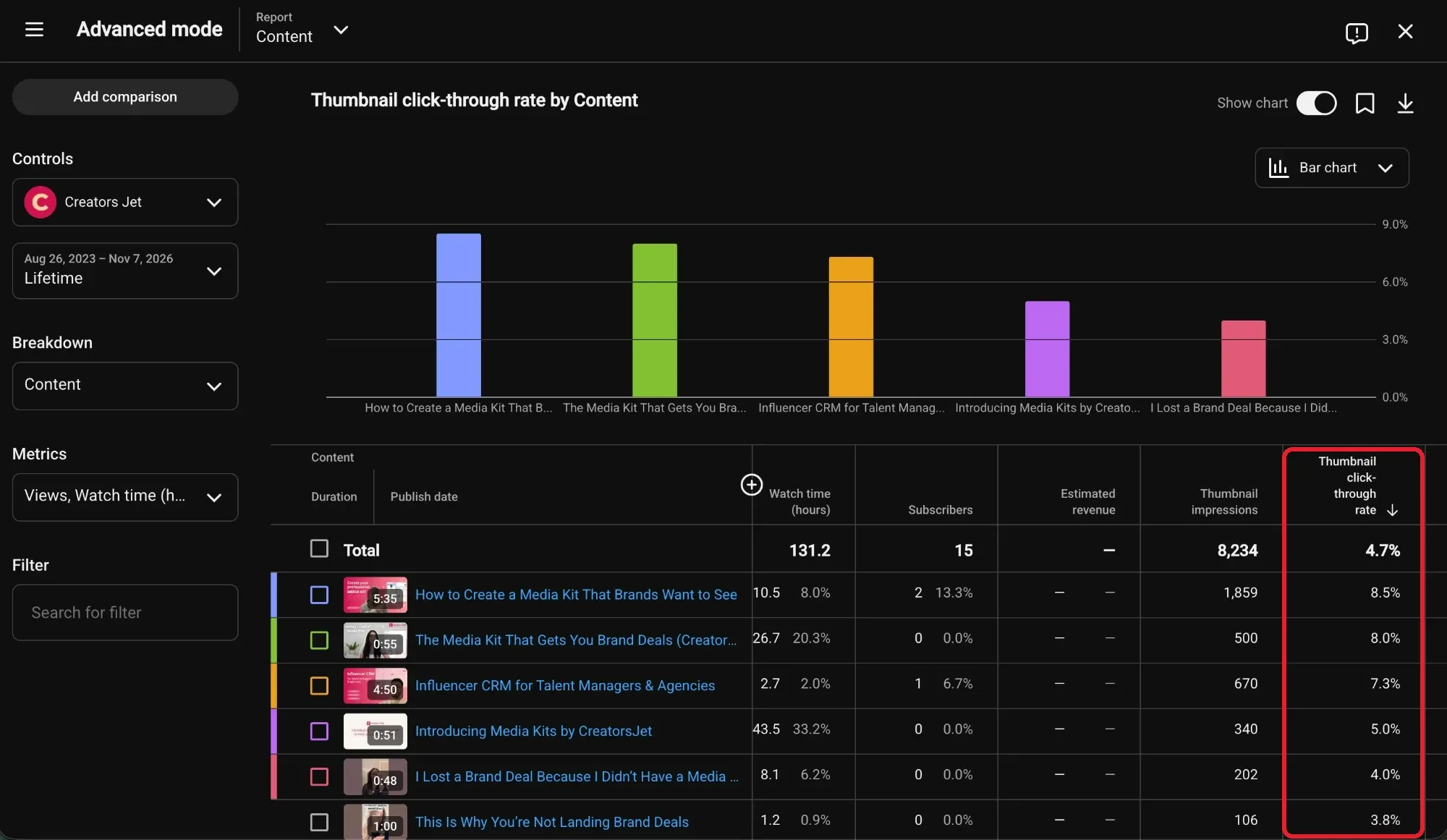
- For a comparison across videos, click Advanced mode, choose the Content report and add Thumbnail impressions and Thumbnail click-through rate as metrics.
- In a video's Reach tab, check the traffic source report to see how viewers found it.
The Content report in Advanced mode puts every video's thumbnail impressions and click-through rate side by side, which makes it easy to see your channel average and the videos above or below it.
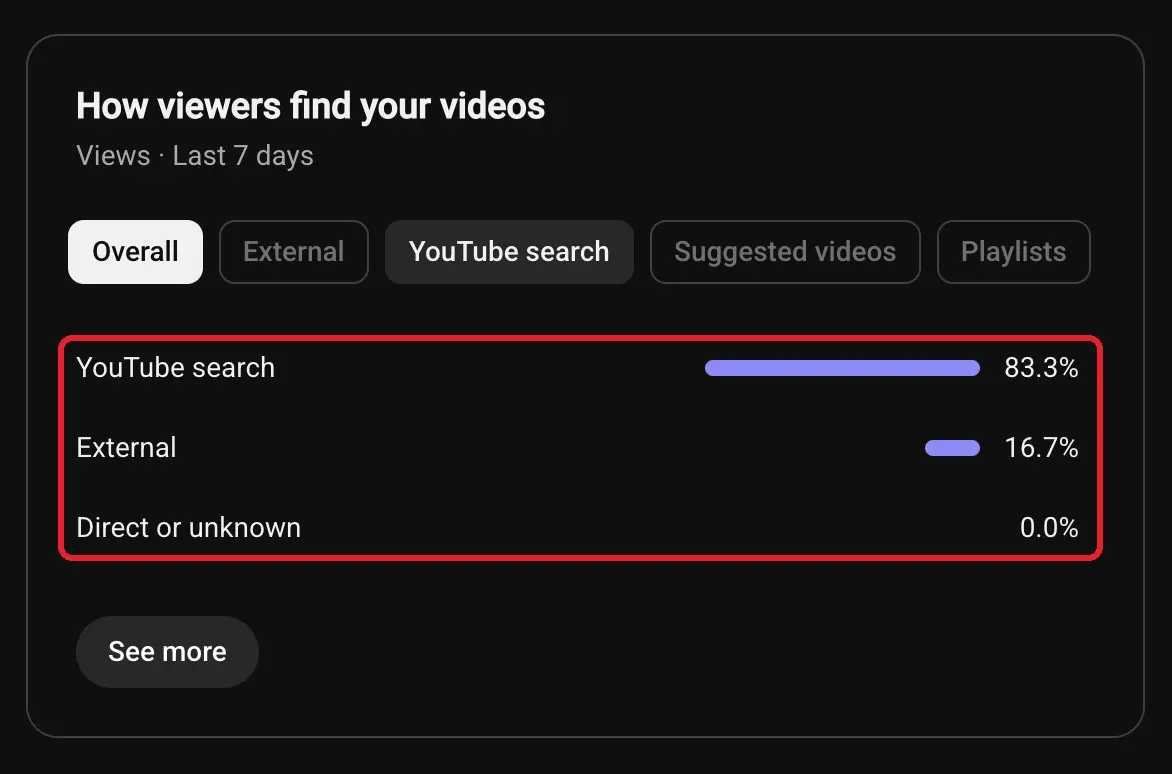
Before drawing conclusions, check where a video's views come from. The traffic source card in Analytics shows the share of views from YouTube search, suggested videos, external sources and other places. A video that gets most of its views from search should be compared with other search-driven videos, not with one YouTube pushes on the homepage.
Three rules keep the comparison fair:
- Compare videos at the same age. A video's CTR in its first 48 hours and over its lifetime are different numbers. Compare first-week CTR with other first-week CTRs.
- Compare videos with a similar traffic mix. A search-driven tutorial and a Browse-driven story video will never have the same baseline.
- Wait for enough impressions. A few hundred impressions can swing several points. YouTube recommends comparing CTR between videos over the long term and not reacting to small changes.
High CTR, low watch time: reading CTR with average view duration
CTR only tells you whether the packaging earned the click. YouTube recommends videos that are relevant to viewers and that hold their attention, and it warns that clickbait shows up as a high CTR with a low average view duration and fewer impressions than expected.
Read the two numbers together:
| Pattern | What it usually means |
|---|---|
| High CTR and high average view duration | The title, thumbnail and video match. Expect CTR to fall as YouTube widens distribution |
| High CTR and low average view duration | The packaging promises something the opening does not deliver |
| Low CTR and high average view duration | The video works for people who click, so the title or thumbnail is the weak point |
| Low CTR and low average view duration | The topic or angle does not fit the audience, and new packaging alone will not fix it |
The third row is where packaging changes pay off most. The second row needs a better opening or a more honest promise, not a more dramatic thumbnail.
Why your CTR dropped: a diagnosis checklist
Before changing anything, work through these questions in order:
- Did impressions grow? If impressions doubled and CTR fell, the video probably reached new audiences. Check whether views went up.
- Did the traffic mix change? A video that moved from search traffic to homepage traffic will lose CTR without anything being wrong.
- Is the video older? CTR is often highest just after upload, when subscribers see it first.
- Is the drop on one video or across the channel? One video points to its packaging or topic. A channel-wide drop over several weeks points to a shift in what the audience wants, or to a run of weaker ideas.
- Did average view duration change too? If both fell, look at the topic before the thumbnail.
- Is the change large enough to matter? Moving from 5.1% to 4.8% on a few thousand impressions is noise.
How to increase CTR on YouTube without hurting retention
Package for the traffic source that matters most
Search viewers need to see their question in the title, written in the words they use. Browse and suggested viewers did not ask for the video, so the thumbnail and title have to create interest on their own. Check the traffic source of your best videos and package new uploads for the source that brings most of your views.
Make the title and thumbnail say different things
A thumbnail that repeats the title wastes space. Let the thumbnail show the situation, result or emotion, and let the title explain the promise. For the design side, this guide to YouTube thumbnails that get views covers planning the two together, choosing one focal point and keeping text readable.
Check the thumbnail at real size
Most impressions happen on a phone, where the thumbnail is small, or on a TV, where it is seen from a distance. Before publishing, look at it at feed size next to other videos in your niche. If the main subject or text is hard to read, simplify it.
Deliver the promise in the first 30 seconds
A higher CTR only helps if viewers stay. Open with the answer, result or situation the title promised. If the audience retention graph drops sharply in the first seconds, the packaging is attracting viewers the opening does not satisfy.
Use YouTube's A/B test for titles and thumbnails
YouTube Studio has a built-in A/B Testing tool, first launched as Test & Compare for thumbnails. You can test up to three titles, three thumbnails, or three title and thumbnail combinations on one video.
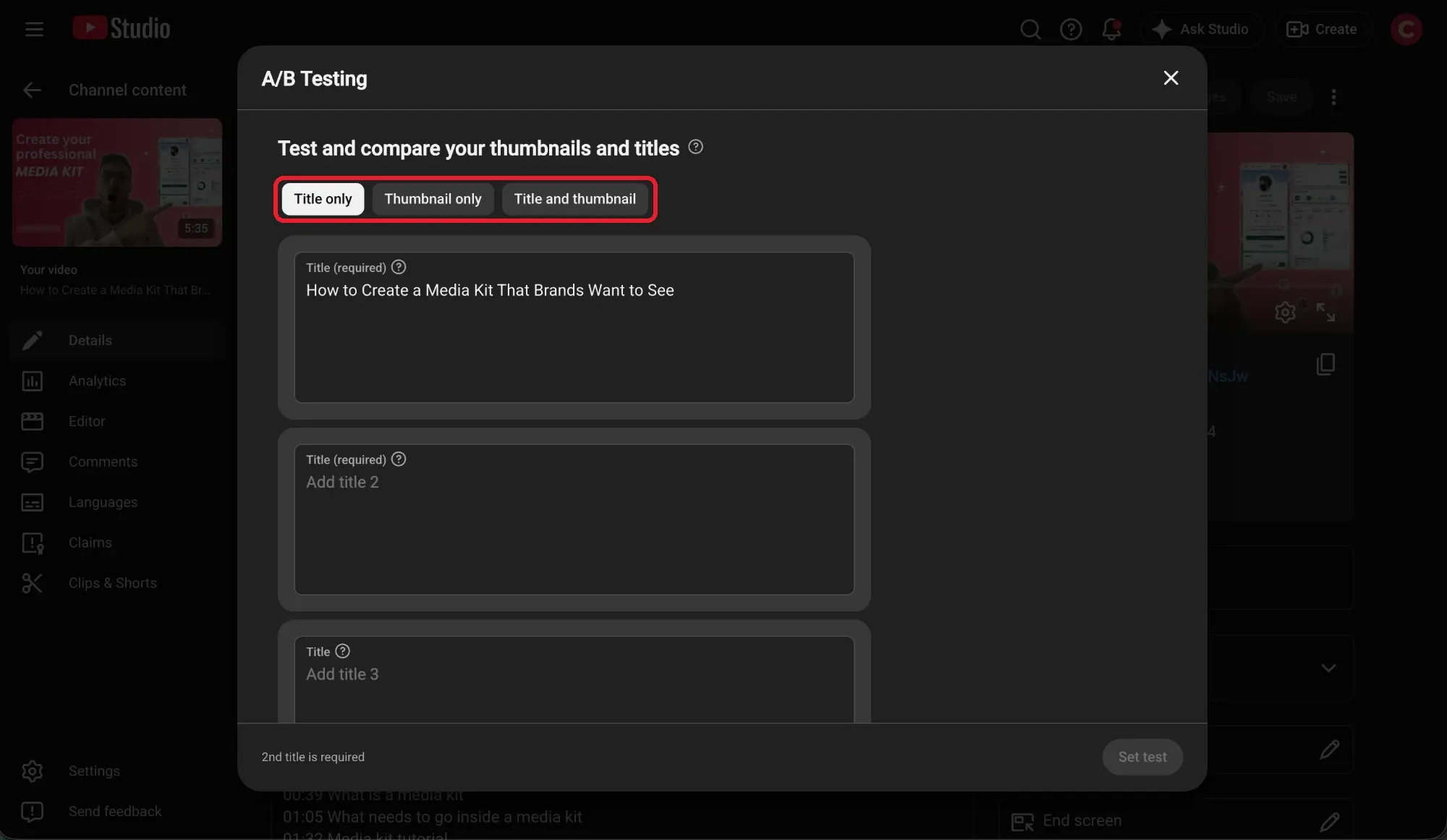
Here is how it works, based on YouTube's guide to A/B testing:
- The winner is chosen by watch time, not CTR. At the end of the test, the version with the highest watch time is shown to all viewers. If there is no clear winner, the first version you uploaded stays.
- It runs on desktop only. Open the video in YouTube Studio on a computer, then click A/B Testing under the title or thumbnail.
- Eligibility is limited. Advanced features must be enabled. Shorts and scheduled live streams cannot be tested, and Premieres become eligible only once they turn into regular videos. Videos made for kids, mature or private videos are excluded.
- Tests take up to two weeks. Editing the title or thumbnail during the test stops it.
- Use high resolution thumbnails. If one thumbnail is below 1280 × 720, all test thumbnails are downscaled to 854 × 480.
YouTube recommends starting with older videos to limit the effect on your channel's views. Test options that are clearly different: two titles that change one word rarely produce a winner.
Refresh older videos one change at a time
Changing the packaging of an older video that has stalled can bring it back into recommendations, especially if the topic is still searched. Leave videos that are still growing alone. If you change something, change one element at a time and compare the following weeks with the same period before the change.
What CTR means for brand deals
Sponsors do not buy CTR. They buy views from the right audience. As this guide to getting sponsored on YouTube explains, average views per video drive most sponsorship pricing, and a channel with 40,000 subscribers and 3,000 views per video is priced like a 3,000-view channel.
CTR is one of the levers behind those views. Better packaging on the same topic can lift typical views, and typical views are what you can show and charge for. That makes CTR a working metric for you rather than a selling point for brands.
In a media kit, put forward what sponsors can compare: typical views for the format they are buying, audience retention, and audience fit. A YouTube media kit should keep long-form videos, Shorts and live streams separate rather than mixing their numbers.
Packaging also matters on sponsored videos. The integration is only seen by people who click the video, so agree with the brand before filming on who controls the title and thumbnail. Explain that a thumbnail built around the product, or a brand name in the title, can change how many people click, and that the views the brand is paying for depend on that click.
Final thoughts
YouTube CTR is a comparison tool, not a score. Judge it against your own videos, from the same traffic source and at the same age, and always next to average view duration. When CTR falls while views grow, the video is reaching new people. When it falls on its own, work through the checklist before redesigning anything, then use YouTube's A/B test to let watch time decide between your best options.