
CREATORSJET VS ADOBE EXPRESS
Skip the manual design work. CreatorsJet is built for creators pitching brands, with auto-syncing verified stats, built-in deal tracking and trackable links.
Choose Adobe Express for branded graphics, videos and documents. Choose CreatorsJet for a dedicated media kit with social stats, collaboration offers and a contact form for brands.
Comparison based on what creators need to pitch brands and land deals.
| Feature | Adobe Express | CreatorsJet |
|---|---|---|
| Platform focus | branded graphics, videos and documents | Media kits & brand deals |
| Social stats in your kit | Add your figures to the design | Profile stats via handle or social integrations |
| Getting your media kit ready | Choose a template and edit its content | Auto-generated with simple customization |
| Sharing with brands | Share your design or export a file | A dedicated public media kit link |
| Media kit PDF export | Yes | Yes |
| Brand inquiries | Add contact details or a contact link | Built-in contact form & deal tracking |
| Updating an exported PDF | Edit and export a new file | Export again, or share your live kit |
| Primary strength | Branded graphics, videos & documents | Media kits for pitching brands |
You create branded graphics and short videos.
You want to design your own media kit document.
You want one media kit link to pitch brands.
You want to find sponsors and track brand deals.
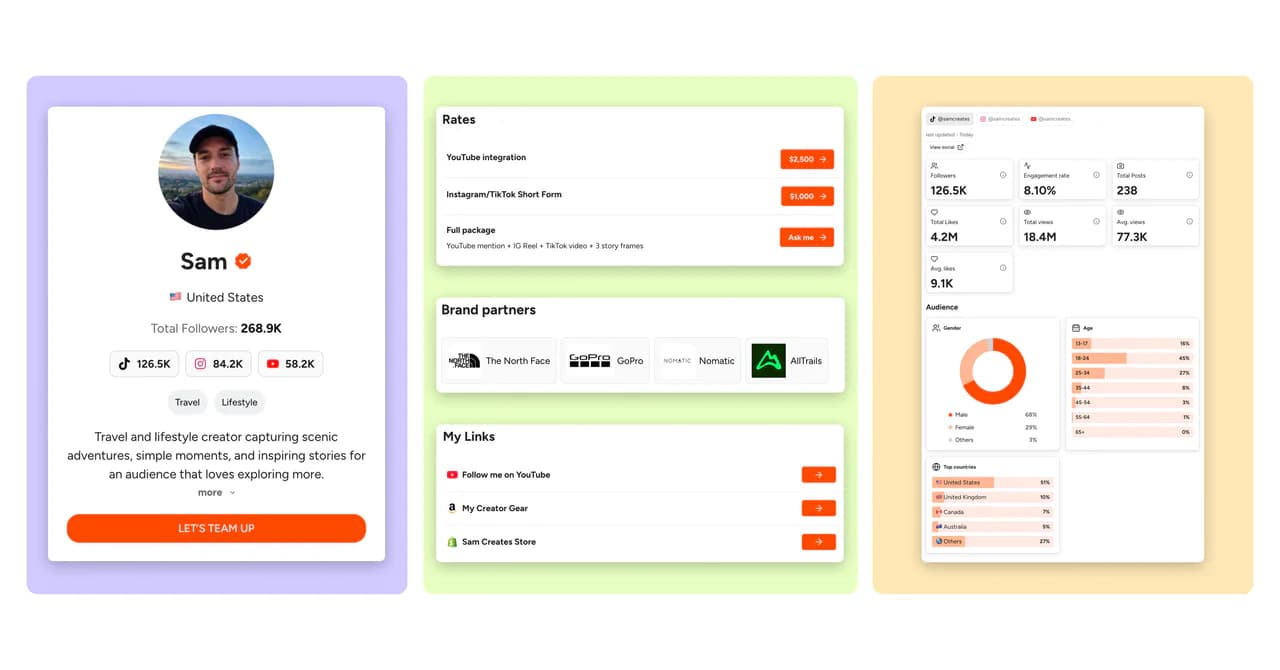
Use Adobe Express to create your visual assets.
Use CreatorsJet to present your work to brands.
Give brands everything they need to choose you.
Explore media kit examples →Introduce yourself and let brands reach you through a built-in contact form.
Introduce yourself on video and show brands what makes you a great fit.
Show your social performance and who your content reaches.
Present your rates, packages and deliverables clearly.
Showcase the brands you’ve worked with.
Bring your website and other important links together.
Spotlight the content you want brands to see first.
Share the story and results behind your collaborations.
Show your best-performing content alongside your latest posts.
Personalize your media kit’s look to match your style.
Adobe Express is designed for branded graphics, videos and documents. CreatorsJet is a dedicated creator media kit tool that brings your social stats, rates, past work and brand inquiries into one shareable page. CreatorsJet hosts your media kit online and gives you a shareable link to send brands; you do not need to arrange separate web hosting.
Yes. Use Adobe Express to design graphics and CreatorsJet to share your media kit with brands. Add your visual assets as images or link to your published work from your kit.
Enter your social handle in the form to start creating your CreatorsJet media kit. Review your profile and stats, then personalize your bio, rates, brand partners and content before sharing your link with brands.
Yes. CreatorsJet has a Free creator plan with one social account, and no credit card is required to get started. On Pro, you can fully white-label your media kit and use your own domain, so the page and its link feel like an extension of your brand. Find Sponsors and agency products have separate plans.
Yes. CreatorsJet offers daily media kit stats updates on Starter and Pro. You can add supported profiles using a handle or social integration; available metrics depend on the platform and connection. Daily updates are not included in Free.
There is no automatic Adobe Express import. Start with your social handle, then add your bio, rates and past work. You can reuse your own images and link to existing work before sharing your new media kit.
Paste your handle to get your first preview in seconds.
Build your professional media kit in minutes with CreatorsJet. The only media kit maker that helps creators secure more brand collaborations.
Ask your favorite AI for a second opinion.
© 2026 CreatorsJet. All rights reserved.


