Create your Facebook media kit
Show brands your Facebook audience, content, and collaboration options. Explore real examples and build a clear page for your next partnership.
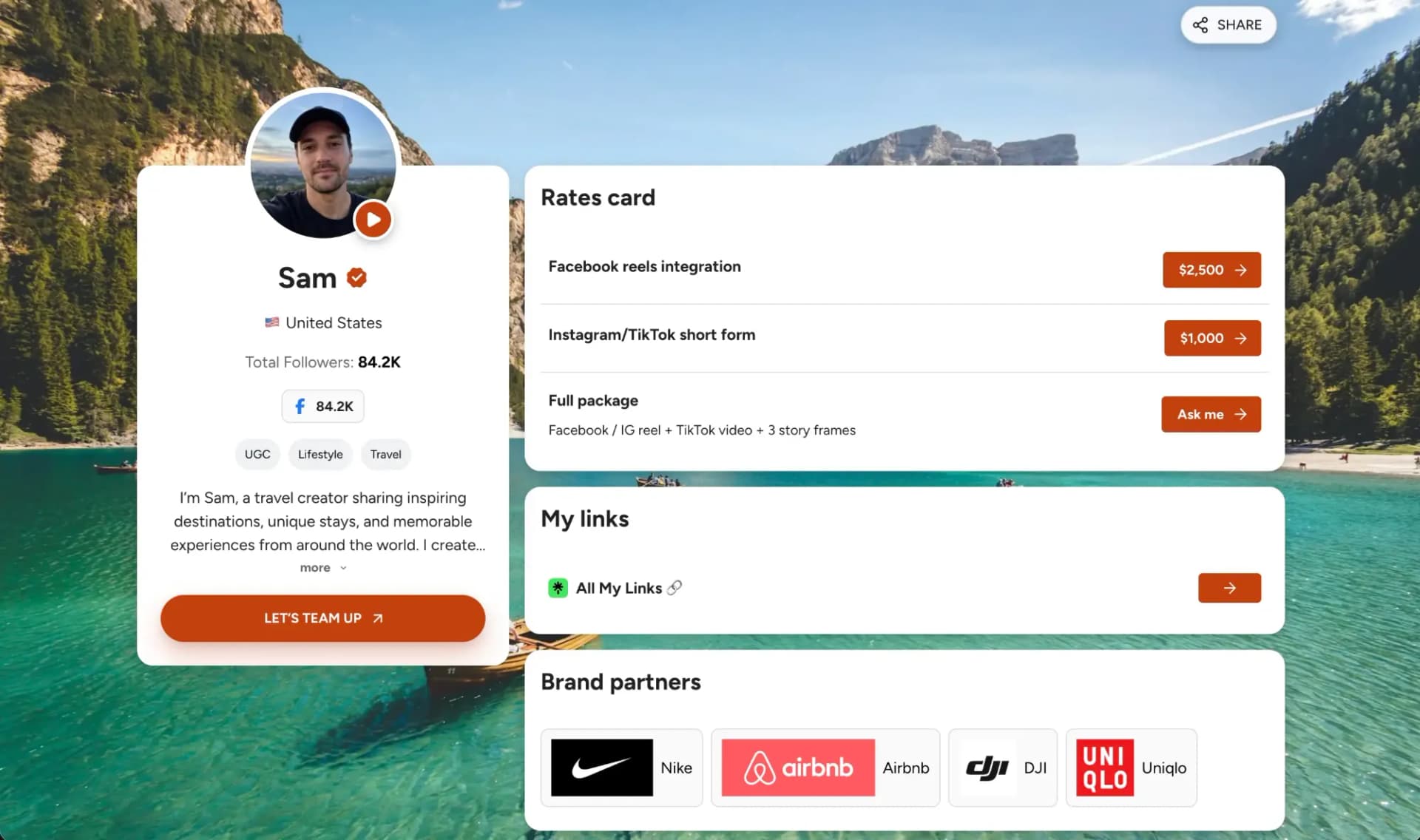
Example creator profile and illustrative metrics
What Is a Facebook Media Kit?
A Facebook media kit is a document or shareable webpage that introduces your Page or professional profile to potential brand partners. It brings together your audience, content performance, work examples, and collaboration options so brands can assess whether you fit their campaign.
3 Real Facebook Media Kit Examples
Real creator kits with Facebook data and concrete examples to learn from. Some include several platforms: select Facebook in their statistics to see the relevant data.
Azizdrives
Automotive
@azizdrives
What to look for
Facebook video performance
Select Facebook to see automotive video metrics and recent posts alongside the creator’s other channels.
Open Facebook exampletheknottygarden
Gardening · seasonal living
@theknottygarden
What to look for
A focused community
Review the Facebook audience and recent content alongside a clear gardening and seasonal-living identity.
Open Facebook example
malpluscats
Pets · family life
@malpluscats
What to look for
Content and campaign context
Explore Facebook statistics alongside pets-and-family content, brand partners, and creator-written campaign case studies.
Open Facebook exampleWhat to Include in a Facebook Media Kit
Keep the structure focused so a brand can understand your fit quickly.
Your Page or profile
Your name, Facebook link, niche, and the content your community follows you for. Identify the account the brand will work with.
Your audience
Followers and available country, city, age, and gender data. Include a snapshot date and focus on the audience relevant to the campaign.
Typical content performance
Show results from comparable recent posts. Label views, viewers or reach exactly as your dashboard reports them.
Content and campaign examples
Link to relevant Reels, posts, or Lives. Separate organic examples from boosted content and explain any campaign results.
Services and usage terms
Define sponsored posts, video, or Live placements. Separate creation, publication, and partnership-ad permissions.
Estimate your Facebook sponsorship rateContact and next step
A business email, availability, and a starting rate or clear way to request a quote.
How to show a Facebook collaboration offer
Give brands a specific placement to discuss. Here’s how a service in your media kit could look.
Example offer · adapt to your profile
One sponsored Facebook Reel
A product demonstration created for your Facebook audience.
What’s included
- One concept and edited video
- One round of edits before publication
- Publication on the agreed Facebook Page or profile
Pricing & terms
Rate available on request
Agree on the date and how long the post stays live. Quote partnership-ad permissions, usage duration, exclusivity, and extra edits separately.
Show the Facebook metrics brands can compare
Use Professional Dashboard or Meta Business Suite. Keep organic results separate from paid distribution and compare similar formats and video lengths.
- Distribution
- Views · viewers or reach, as labeled
- Video attention
- Watch time · audience retention
- Community response
- Reactions · comments · shares
For example, use 10 recent comparable posts and state their dates. Keep Facebook results separate from Instagram cross-posts, and do not treat repeat views as unique people.
- Average interactions per post
- 250
- Followers
- 10,000
- Engagement rate
- 2.5%
How is this calculated?
One transparent follower-based engagement calculation is:
((average reactions + average comments + average shares) ÷ followers) × 100
Use the same post sample and reporting window. Date the follower count. This example excludes clicks: name any additional interactions you include, and never compare it directly with a rate based on reach or views.
Read Meta's creator Insights updateWhat brands look for in a Facebook media kit
Audience relevance
Do your community’s interests and locations match the campaign?
Realistic distribution
Show typical Facebook results and identify any paid promotion.
Content that holds attention
Use relevant videos, watch behavior, and meaningful audience responses.
A clear agreement
Specify the account, placement, usage permissions, timing, and next step.
How to make a Facebook media kit in 3 steps
Gather your Facebook insights and relevant content, then turn them into a page brands can review.
Add your Facebook presence
Introduce your Page or professional profile, niche, and audience. Add other relevant platforms if needed.
Choose your proof and offer
Select representative results and content examples. Define what the brand can book and which rights are included.
Review and share your kit
Date your data, check links and mobile layout, and share the kit with your collaboration proposal.
Why build your kit with CreatorsJet?
Your content and audience together
Bring your Facebook results, work examples, and collaboration offer into one media kit.
Make it yours
Personalize your theme, bio, and services for your creator business.
One link for sponsors
Update your kit and reuse the same link in sponsorship conversations.
Facebook Media Kit FAQ
Is this for a Facebook Page or a professional profile?
You can present either. Identify the account, link to it, and use the insights available for that account. If you include more than one Page or profile, label each audience and its results separately.
Should I show views, reach, or followers?
Use followers as audience context and content-level metrics as performance evidence. Copy the exact metric names from your dashboard and date the data. Views can include repeated viewing, so do not present them as unique people reached.
Should I combine Facebook and Instagram results?
Keep them separate, even when the same Reel appears on both platforms. Identify each account, metric, and reporting period so a brand can assess the Facebook placement itself.
Are partnership ads included in a sponsored post?
Do not assume so. Partnership ads require the relevant permissions and eligibility. Agree separately on advertising use, duration, and price rather than treating organic publication as blanket advertising permission.
What if I have no previous brand collaborations?
Use relevant organic posts, Reels, or Lives and real audience data. Label sample campaigns clearly. Show what you can create without inventing brand relationships or results.
Should I include my rates?
You can list a starting rate for a defined service or offer a quote after the brief. Specify content, publication, revisions, usage, and any paid promotion so the price has a clear scope.
Keep building your media kit
Guides and examples for the next step, from what to include to the kit maker itself.
A guide to the sections, stats and rates brands expect.
See how creators present audience, past collabs and pricing.
Build a live media kit with stats that update automatically.
Ready to create your Facebook media kit?
Build a clear, pitch-ready page with the Facebook proof, collaboration options, and contact details brands need to understand why working with you makes sense.



