Create your Instagram media kit
Show brands your audience, Instagram performance, and best work in one shareable page. See real media kit examples and learn what to include before your next pitch.
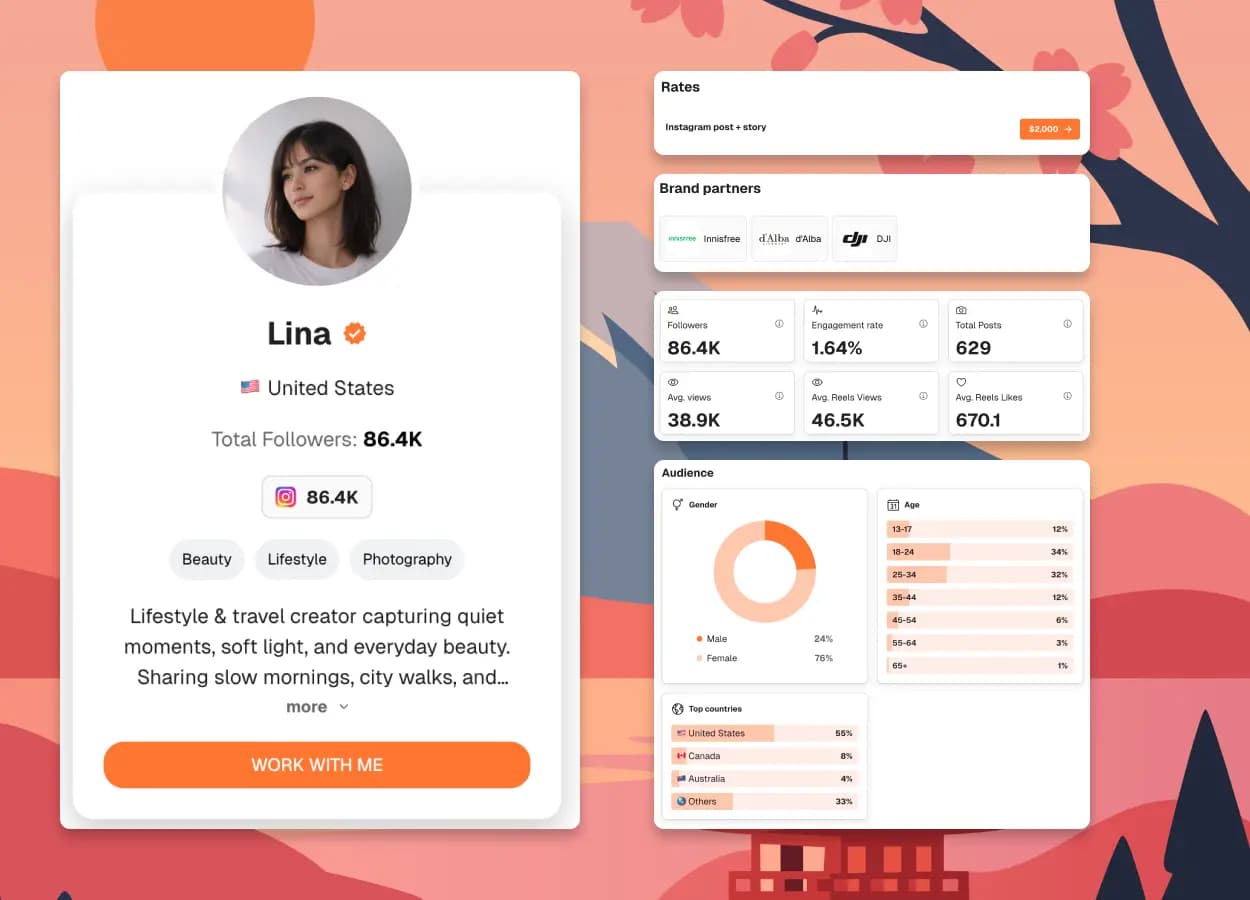
Followers
86.4K
Engagement rate
1.64%
Avg likes
670.1
Avg Reel views
46.5K
Example creator profile and illustrative metrics
What is an Instagram media kit?
An Instagram media kit is a document or shareable webpage that introduces a creator to potential brand partners. It brings together your audience demographics, Instagram performance, content examples, and collaboration options so brands can assess whether you fit their campaign.
3 Real Instagram Media Kit Examples
Real creator kits with Instagram data and concrete examples to learn from. Some include several platforms: select Instagram in their statistics to see the relevant data.

Itsalexfaafetai
Family · travel
@itsalexfaafetai
What to look for
Reels and Story packages
See separate offers for an Instagram Reel, a three-frame Story set, and cross-platform packages alongside Instagram audience data.
Open Instagram example
Sherisse Renée
Events · style
@sherisse.renee
What to look for
Posting versus UGC
Compare Reels, carousels, and event coverage with a UGC offer that explicitly excludes posting to the creator’s own channels.
Open Instagram example
Vanessa Mendez, RDN, MS, CDCES
Nutrition · recipes
@the.healthybite
What to look for
A clear specialist niche
See how nutrition credentials, Instagram audience information, and English- and Spanish-language Reels define the collaboration offer.
Open Instagram exampleWhat to Include in an Instagram Media Kit
An Instagram media kit introduces you to potential sponsors. Keep your audience, performance, work, and offer together so a brand can decide whether you fit its campaign.
Your profile and niche
Your name, handle, location, and a short bio that says what you create and who you reach.
Audience demographics
Current followers, top locations, and available age and gender data. Add the date of your audience snapshot.
Instagram performance
Typical Reel and Story performance, with dates and sample size. Keep viral outliers separate from your averages.
Content and collaborations
Two to four relevant posts or campaigns. Link to the original work and explain your role or results.
Services and pricing
The formats brands can book and what each includes. Show starting rates or offer a quote after a brief.
Estimate your Instagram ratesContact and next step
A business email and a clear next step. Test your links and make sure the kit reads well on mobile.
How to show a collaboration offer
Give brands a concrete package to discuss. Here’s how the services section of your media kit could look.
Example offer · adapt to your services
1 Reel + 3 Story frames
A product demo published on your Instagram, supported by Stories.
What’s included
- 1 Reel demonstrating the product
- 3 Story frames with a link sticker
- 1 round of edits before publication
Pricing & terms
Rate available on request
Quote paid ad usage and exclusivity separately. Agree on publishing dates in the campaign brief.
Make your Instagram stats easy to compare
Show typical performance, date your stats, and make your calculation method clear.
- Reels
- Views · reach
- Stories
- Reach · link taps
- Posts & carousels
- Saves · shares
Use one reporting window (for example, the last 30 days). State how many Reels, Stories, or posts you sampled, and show averages per format where available.
- Average interactions per post
- 250
- Followers
- 10,000
- Engagement rate
- 2.5%
How is this calculated?
Use Instagram Insights where available and keep reporting windows consistent. For a follower-based engagement rate, one common calculation is:
((average likes + average comments + average saves + average shares) ÷ followers) × 100
Name the interactions you include and the posts sampled. If you calculate engagement by reach instead, label that denominator clearly. Use the same method when comparing results; leave unavailable metrics out rather than estimating them.
Instagram Insights guideWhat brands look for in an Instagram media kit
The right audience
Do your audience’s interests and locations match their customers?
Consistent performance
Show typical reach and engagement across recent posts.
Relevant content
Choose work that fits the brand’s style and campaign.
A clear offer
Make deliverables, rates or quote options, and contact details easy to find.
How to make an Instagram media kit in 3 steps
Gather your current Instagram Insights and a few relevant content links, then turn them into a kit you can send with your next pitch.
Add your Instagram profile
Add your bio, niche, and social profiles. Make it easy for brands to understand who you reach.
Choose your proof and offer
Choose relevant stats, work examples, and services. Personalize the theme and date your audience figures.
Review and share your kit
Check your kit on mobile, then share its link in pitches and applications. Keep your information current.
Why build your kit with CreatorsJet?
Everything in one place
Bring your audience, stats, and best work into one media kit.
Make it yours
Personalize your theme, bio, and services to match your brand.
One link to share
Update your kit and keep using the same link in every pitch.
Instagram Media Kit FAQ
Should I include rates in my Instagram media kit?
Include starting rates when your deliverables are standardized and you want to qualify budgets early. Use “available on request” when the fee depends heavily on scope, usage rights, exclusivity, production, or timing. In either case, explain what the base fee includes.
What should I show if I have never worked with a brand?
Use relevant organic posts, clearly labeled concept or sample work, real audience data, and transferable proof of your creative process. Do not invent clients, testimonials, results, or partnerships.
Do I need a minimum number of followers for a media kit?
No. A specific audience, relevant content, credible performance context, and a clear offer can matter even when the account is small. The media kit should make that fit easy to see.
Should my Instagram media kit be a PDF, web page, or both?
A PDF works for attachments and application portals. A web page provides one stable link and is easier to update. Keeping both is practical when brands use different workflows, as long as the content and dates stay consistent.
How long should an Instagram media kit be?
One page is enough for many creators. Use a second page only when work examples, case-study context, or a multi-platform offer genuinely needs the space. A brand should be able to find the core fit and contact information quickly.
How often should I update my Instagram media kit?
Check it monthly when you are pitching actively, or at least quarterly and before a major proposal. Update sooner when your typical performance, audience, services, rates, or best examples change materially.
Keep building your media kit
Guides and examples for the next step, from what to include to the kit maker itself.
A guide to the sections, stats and rates brands expect.
See how creators present audience, past collabs and pricing.
Build a live media kit with stats that update automatically.
Ready to create your Instagram media kit?
Put your stats, proof, deliverables, and contact details in one page brands can review quickly.



