

To get sponsored on YouTube, make your channel easy for a brand to evaluate, build a list of companies that already pay creators in your niche, and pitch the person who controls the creator budget with a specific integration idea and a price based on your average views. There is no official subscriber minimum for direct deals. YouTube's own Creator Partnerships program requires the YouTube Partner Program, but most sponsorships still come from direct outreach and inbound emails.
The steps below cover the full path, from preparing the channel to the report that turns a one-off deal into a repeat sponsor.
Types of YouTube sponsorships
Knowing the formats helps you pitch the right one and price it correctly.
- Integrated sponsorship. A 30 to 90 second segment inside a regular video, usually in the first third. This is the most common format and the baseline most rates are built on.
- Dedicated video. The whole video is about the product: a review, a tutorial, or a comparison. Brands pay more because the product gets the full runtime, and the creator takes on more risk with the audience.
- Short mention. A shout-out of 30 seconds or less, often bundled with a description link. It costs less and works as a first test with a new brand.
- Sponsored Short. A vertical video built around the product, usually priced lower per 1,000 views than a long-form integration.
- Product seeding. The brand sends a free product, with or without an obligation to post. Common for smaller channels and often the first step toward paid work.
- Affiliate or code deal. A commission on sales from a tracked link or discount code, sometimes paired with a small flat fee.
Most first paid deals are integrations. Brands use them to test a channel before committing to dedicated videos or a recurring slot.
What brands check before sponsoring a YouTube channel
Brands, and the agencies that manage their budgets, rarely decide on subscriber count alone. They look at signals that predict how many of the right people will see the sponsor segment.
- Average views per video. The views your last 10 to 15 long-form videos reached after 30 days. This number drives most pricing. A channel with 40,000 subscribers and 3,000 views per video is priced like a 3,000-view channel.
- Audience location and age. A US software company wants to know whether viewers are in the US and of working age. YouTube Studio shows top countries, age groups, and returning viewers under Analytics, then Audience.
- Niche fit. The closer your topic is to the product's use case, the less the brand has to convince your viewers.
- Consistency. A regular upload schedule tells a brand when its video will go live and that the channel will still be active next quarter.
- Comment quality. Real questions and discussion signal an audience that pays attention. Brand managers often scroll through comments before replying to a pitch.
- Previous sponsors. Past integrations show that you can deliver a segment without losing viewers.
How many subscribers do you need to get sponsored?
None for direct deals. No subscriber threshold applies when a brand works with a creator directly, so small channels can and do get sponsored. The formal minimums come from specific programs: YouTube Creator Partnerships requires membership in the YouTube Partner Program, and some marketplaces set their own entry bar.
What changes with size is the type of deal. A realistic path for a channel under 10,000 subscribers looks like this:
- Affiliate programs and discount codes. Low risk for the brand, and they build proof that your audience buys.
- Product seeding. Accept products you would use anyway and review them honestly.
- Paid integrations. Pitch these once your average views have been steady for a few months.
Small channels in focused niches have a real advantage. A channel reviewing accounting software for freelancers reaches a narrow audience that a general tech channel cannot. As an example, a video that reliably gets 3,000 views at a $20 to $40 CPM justifies roughly $60 to $120 per integration. That is a modest fee, but it is a paid deal and a reference for the next pitch.
Step 1: Make your channel sponsor-ready
Before contacting anyone, check the channel through a brand manager's eyes. They will spend a minute or two on it before deciding whether to reply.
- Add a business email. Put a dedicated address in the channel's About section so brands can reach you directly. A separate inbox also keeps sponsor emails out of personal mail.
- Screen inbound offers. A public business email also attracts fake sponsorships. A common scheme impersonates a brand and sends a "contract" or "demo software" file that steals the login session and hijacks the channel. Never open executable files or password-protected archives from an unknown sponsor, and check that the sender's domain matches the brand's website.
- State the niche clearly. The first lines of the channel description and the banner should say who the channel is for and what it covers.
- Organize playlists by topic. Brands look for the videos where their product would fit. Playlists make that easy.
- Show the format. If you have no sponsors yet, a segment for an affiliate product you already use shows how an integration would look in your videos.
- Keep a schedule. Brands plan campaigns weeks ahead and need to know when a video can go live.
Step 2: Prepare a one-page media kit
A media kit answers the questions a brand would otherwise ask in the first reply. Keep it to one page and update it every month.
Include:
- A one-sentence channel summary: topic, audience, and format.
- Average views per long-form video over the last 90 days, and Shorts views listed separately.
- Top audience countries and the main age range.
- Average comments and likes per video.
- Formats offered, with starting prices or a note that rates are available on request.
- Past sponsors, ideally with one result such as clicks, code uses, or a renewal.
- Business contact details.
Screenshots of YouTube Studio data are more credible than typed numbers. Crop them so they show only what the brand needs.
Step 3: Build a list of brands that already sponsor YouTubers
The best predictor of a sponsorship is a brand that already pays creators like you. Its budget exists, its team knows how YouTube integrations work, and it is actively looking for new channels.
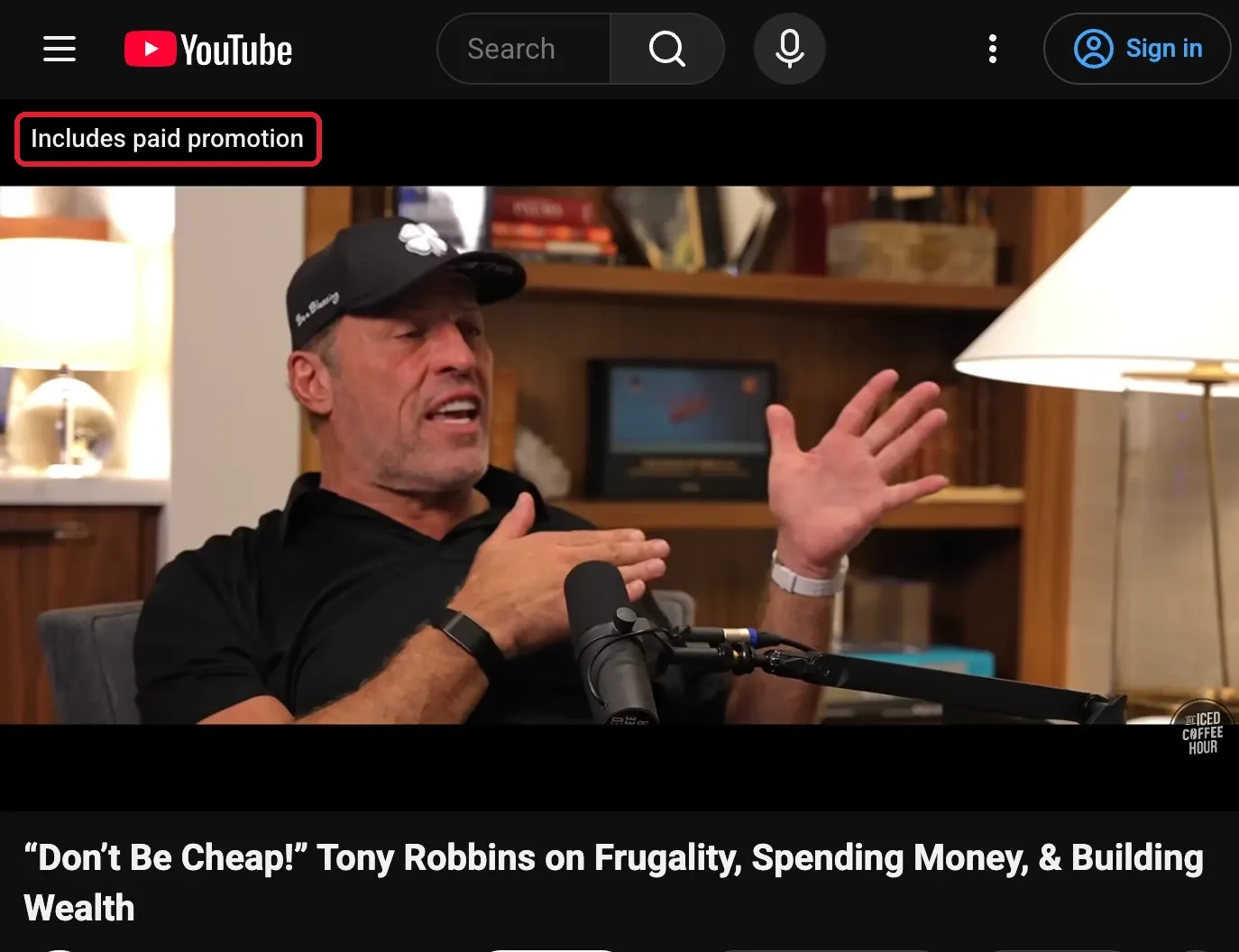
Start with the channels in your niche that are slightly larger than yours. Videos that contain paid promotion show an "Includes paid promotion" label at the start. Check the description for tracking links and discount codes such as a creator name followed by a number, and note where in the video the segment appears.
Other ways to grow the list:
- Search YouTube for sponsor language. Queries such as "use code" or "sponsored by" plus a niche keyword surface integrations quickly.
- Check brand program pages. Search for "[brand] creator program", "[brand] influencer program", or "[brand] affiliate program". Many brands have an application form or a dedicated contact.
- Use existing brand lists. Go through this list of brands that work with influencers and keep only the ones whose products fit your audience.
Track every prospect in a spreadsheet: brand, channels it sponsored, format, date, and product. A brand that sponsored three channels in your niche over the last six months is a better prospect than a famous brand that has never paid a YouTuber.
Step 4: Find the person who decides
Generic inboxes such as info@ or support@ rarely reach the person who owns the creator budget. Pitches sent there often go unanswered or get forwarded weeks later.
Look for these job titles instead:
- Influencer Marketing Manager
- Creator Partnerships Manager or Partnerships Lead
- Brand Marketing Manager at smaller companies
- Head of Growth or Marketing Lead at startups
Many brands run creator campaigns through agencies. If the sponsored videos you found were managed by an agency, pitch the agency, since it often handles several brands with similar audiences.
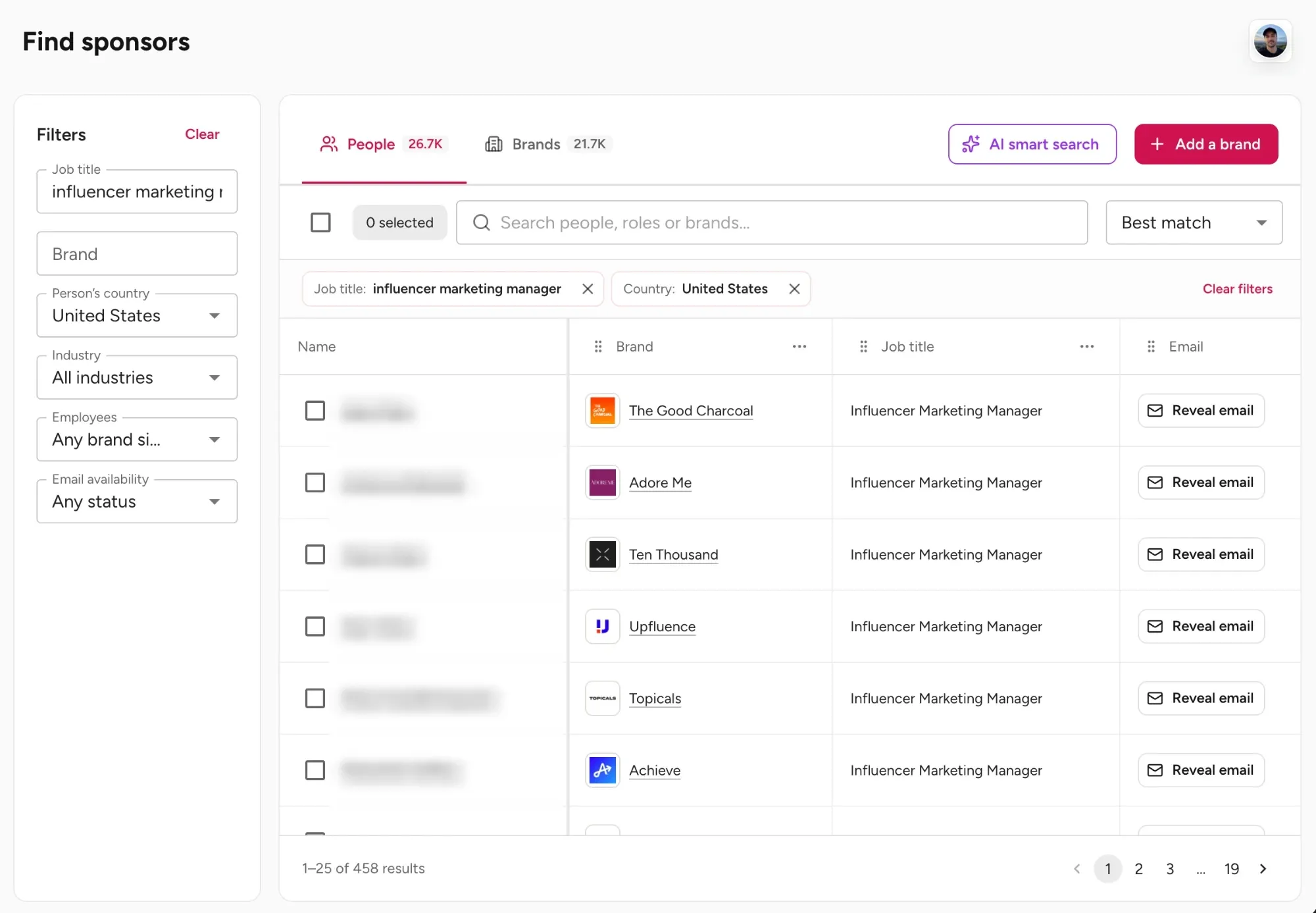
LinkedIn works for this, but searching brand by brand is slow once the list reaches 50 names. A sponsor contact database shortens the research: CreatorsJet's Find Sponsors filters brand contacts by job title, country, industry, and company size, with emails where available. Filtering for influencer marketing managers in the United States, for example, shows who handles creator partnerships at each brand, with the company next to each name.
Contact one person per brand. Emailing three people at the same company at once usually ends the conversation before it starts.
Step 5: Send a pitch written for YouTube
A YouTube pitch works when the brand can picture the video before replying. Generic "let's collaborate" emails fail because they leave all the work to the brand.
A complete pitch covers:
- A subject line that names the brand and a format.
- Why this brand. Proof that you know or use the product.
- A video idea. A specific upcoming video and where the segment fits.
- Format and placement. For example, a 60-second integration at the two-minute mark, a link in the first line of the description, and a pinned comment.
- Expected reach. A views range based on your average, not your best video.
- One proof point. A past result, a relevant audience statistic, or a comment from a viewer asking about the product category.
- A simple next step. Ask whether the brand has creator campaigns planned for a specific month.
Example pitch:
Subject: [Brand] x [Channel]: a 60-second integration in an upcoming tax video
Hi [Name],
I run [Channel], a channel about personal finance for freelancers. My last 10 videos averaged [X] views in their first 30 days, with [Y]% of viewers in the US.
I've used [Product] for invoicing since last year, and my next video, "How freelancers set aside money for taxes", is a natural fit. I'd propose a 60-second integration around the two-minute mark, a link in the first line of the description, and a pinned comment.
A similar integration for [Previous sponsor] drove [result] last month.
Would a test video in [month] fit your creator plans? I can send the media kit and rates.
[Your name]
Send one follow-up after five to seven business days, and a second one a week later. If there is still no reply, move on and try again next quarter with a new video idea.
Step 6: Use YouTube Creator Partnerships and sponsorship marketplaces
YouTube BrandConnect is now called YouTube Creator Partnerships. According to YouTube's Creator Partnerships help page, a channel needs to meet these conditions:
- Be at least 18 years old.
- Be in the YouTube Partner Program.
- Be based in a supported country or region. The list covers 24 markets, including the US, UK, Canada, Australia, India, Brazil, France, Germany, Spain, Mexico, and Japan.
- Have no active Community Guidelines strikes.
There is no separate application. Eligible channels see a Creator Partnerships tab under Earn in YouTube Studio.
Inside the tab, creators can:
- Respond to brand inquiries as interested or not interested. Each inquiry shows the brand, a potential earning amount set by the advertiser, and sometimes deliverables and payment terms.
- Set desired rates for long-form videos and Shorts, and add a business contact such as a manager.
- Customize a media kit built from channel audience data.
- Upload campaign videos as Unlisted for brand review.
- Browse Open calls, where brands post briefs with a budget and a deadline. Creators submit a custom video that the brand can run as a sponsored ad, for a chance to earn.
The earning amount shown on an inquiry is a starting point, not a final offer. Treat it like any other negotiation.
Third-party marketplaces add more inbound opportunities. Collabstr lets creators list packages that brands buy directly. Passionfroot gives creators a storefront for sponsorship slots and is popular with business and B2B creators. ThoughtLeaders focuses on YouTube and podcast sponsorships and works with brands and channels on placements. These platforms usually take a fee or commission on deals, so check current terms before signing up.
Use them alongside direct outreach, not instead of it. Marketplaces bring volume, but the best-fit sponsors in your niche are usually the ones you contact yourself.
Step 7: Price and scope the deal
How much YouTube sponsors pay
Most YouTube sponsorships are priced on expected views:
Average views per video × CPM ÷ 1,000 = estimated fee
At 50,000 average views and a $25 CPM, that gives about $1,250 for one integration.
| Channel size | Typical fee for one integration |
|---|---|
| 1,000 to 10,000 subscribers | $50 to $500, often product plus a fee |
| 10,000 to 50,000 subscribers | $200 to $1,500 |
| 50,000 to 500,000 subscribers | $1,000 to $10,000 |
| 500,000 to 1 million subscribers | $5,000 to $20,000 |
| Over 1 million subscribers | $10,000 to $100,000 or more |
These ranges are planning estimates from public 2026 benchmarks, not audited deal data. Average views matter more than the subscriber tier.
The niche moves the CPM considerably, from about $15 to $25 for lifestyle and vlogs up to $40 to $80 for B2B software. Format matters too: a dedicated video usually costs 1.3 to 4 times an integration, while a short mention costs about half to two-thirds of one. The full breakdown of how much brands pay for YouTube sponsorships covers CPMs niche by niche and how to adjust a quote for each format.
What to agree on before filming
Price is only half the deal. Put the scope in writing:
- Deliverables and placement. Segment length, position in the video, description link, pinned comment.
- Approvals. Whether the brand reviews a script, a draft, or both, and how many revision rounds are included.
- Publish date. Plus how long the video must stay public.
- Usage rights. Whether the brand can run your video or segment as an ad, for how long, and at what extra fee.
- Exclusivity. Which competitors you cannot work with, and for how long. Exclusivity should be paid.
- Payment terms. Amount, due date (net 30 is common), and a deposit for first-time brands.
- Reporting. Which metrics you share and when.
Step 8: Deliver, disclose, and report
Delivery is where most repeat sponsorships are won or lost.
- Disclose the sponsorship. In YouTube Studio, open the video's details and tick the paid promotion box. YouTube then shows the "Includes paid promotion" label. The label alone is not enough: say it out loud at the start of the segment and mention it in the description. In the US, the FTC's disclosure guide for influencers explains what a clear disclosure looks like, and other countries have their own rules.
- Respect the brief. Send the script or draft on the agreed date, keep the segment to the agreed length, and check that every link and code works before publishing.
- Report at 7 and 30 days. Share views, audience retention around the sponsor segment, link clicks if you used a tracked link, and comments that mention the product. Ask the brand for code uses or sales if they track them.
End the 30-day report with a concrete next step: a second video idea, a three-video package, or a recurring monthly slot. Brands renew creators who make the decision easy, and a clear report with a ready-made proposal does exactly that.
Final thoughts
Getting sponsored on YouTube is less about reaching a subscriber milestone than about running a simple, repeatable process. Target brands that already pay channels like yours, reach the person who owns the budget, pitch a specific video with a realistic price, and report results after every campaign.
Start with a list of 20 prospects, send personalized pitches in small batches, and track every reply. After a few rounds, the pattern of which brands answer, which formats they buy, and what they pay becomes clear, and each new pitch gets easier to write.