


To find a brand's PR email, check four places in this order: the brand's website (footer, Contact, Press, or a page for creators), its Instagram bio and Email button, LinkedIn for the person who runs influencer marketing or partnerships, and the media contact at the bottom of its press releases. If you find a name but no address, work out the company's email format and verify it before sending. A named contact beats a generic inbox almost every time.
Who to contact at a brand
The "PR email" is not always the right inbox. Pick the contact based on what you want from the brand:
- Influencer marketing or creator partnerships manager. The best contact for paid collaborations and gifting. Titles vary: influencer marketing manager, creator partnerships lead, social and influencer manager.
- PR manager or PR agency. Handles press, product launches, and PR lists. The right contact if you mainly want to receive products or be added to a launch mailing. The guide on how to get PR packages explains what these teams look for.
- Partnerships or brand partnerships manager. Covers larger deals, events, co-branded projects, and sometimes affiliate programs.
- Founder or marketing manager. At small brands with no dedicated influencer team, this is often the person who decides.
The social media manager who runs the main account is rarely the decision maker. At large brands, skip the CEO and the global CMO: they will not answer, and forwarding a pitch down the chain slows it down.
Email, form, platform or DM: how to contact brands for collaboration
Email to a named person is the default, but it is not always what the brand wants. Check which channel the brand has set up before writing:
| Channel | Best for | Watch out for |
|---|---|---|
| Email to a named contact | Paid ideas, gifting requests, and pitches outside any program | Needs the right person and a verified address |
| Creator application form on the brand's site | Brands with an open ambassador or creator program | Follower minimums, regions, and slow or automatic replies |
| Creator platforms such as LTK or ShopMy | Creators already active on those apps | Only brands that post offers there, often with fixed fees |
| Instagram DM to the brand account | Small brands where the founder answers messages | Large brand inboxes are full of customer questions |
| LinkedIn message | Reaching a contact whose email you cannot find | Many marketers rarely check LinkedIn messages |
When a brand has a creator program, apply through it first. Huda Beauty, for example, asks for 1,000 followers on Instagram or TikTok through its program page, while Gymshark has no application at all and finds creators itself. Some brands run these programs on creator management tools such as GRIN or Aspire, and creators usually reach them through the brand's own application link or invitation.
Email is still worth it next to a form when you have a specific idea, such as a launch you want to cover or a series you already plan, because forms are built for general sign-ups, not proposals.
Where brands list PR and partnership contacts
Before searching for contacts, build a shortlist of brands that already pay or gift creators. The lists of brands that work with influencers and brands looking for UGC creators are good places to pick from. Then use the four sources below to find the right person at each brand.
1. The brand's website
Start with the footer and the Contact page. Look for links named Press, Media, Collaborate, Creators, Influencers, Ambassadors, or Affiliates. Some brands add a dedicated section to their FAQ or help center.
Paula's Choice, for example, has a contact page for press, media, and influencer enquiries. It lists a dedicated PR address and tells creators exactly what to include before writing.
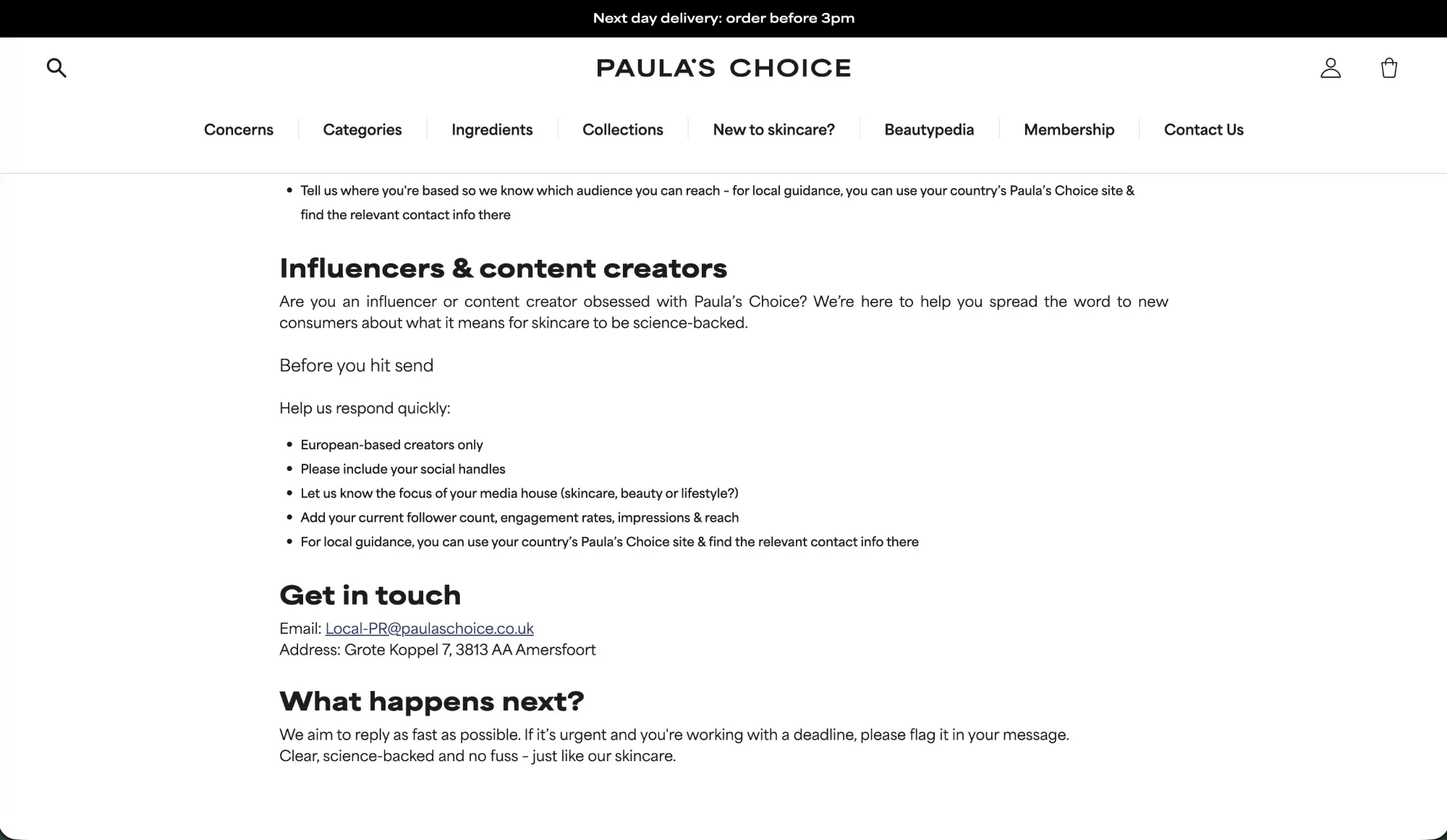
Two details on that page matter for every brand. The address is limited to European-based creators, and creators elsewhere are sent to their country's site. Many brands split PR by region, so look for the local site before pitching the global inbox. The checklist also shows what the team needs to reply quickly: social handles, niche, follower count, engagement rate, and reach.
If the site menu shows nothing, search Google with site:brand.com press, site:brand.com collab, or site:brand.com influencer, replacing brand.com with the brand's domain. This often surfaces pages that are not linked from the menu.
Some brands list a press address that belongs to their outside PR agency. That is a valid contact: agencies often manage gifting lists and pass relevant pitches to the brand.
2. The Instagram bio and Email button
Brands with a business account can add an Email button under their bio. Tapping it opens a new email to the address the brand chose to share. The button appears in the Instagram app but usually not in a desktop browser, so check from your phone.
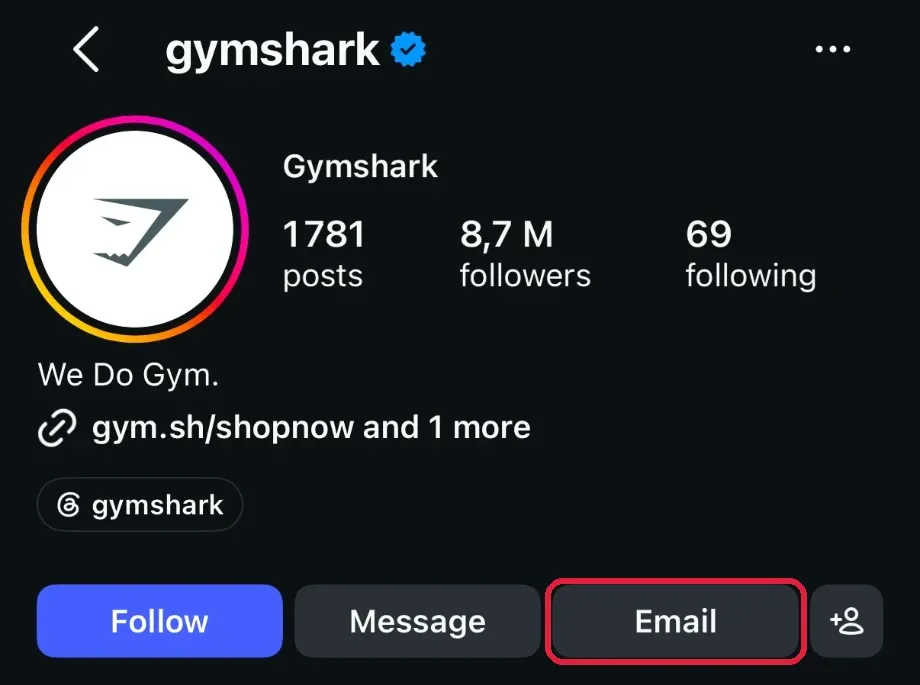
Also look at the bio text, the link in bio page, and story highlights. Some brands write a dedicated address there, such as a collabs or partnerships email, or a link to a creator application form.
The address behind the Email button is sometimes a general inbox. Use it when nothing more specific exists, and write a subject line that tells the reader where to forward the email. The same logic applies to the email shown on a brand's TikTok profile and to the business email on a YouTube channel's About section.
At large brands, a DM to the main account is the weakest option. Those inboxes receive customer questions all day, and pitches get lost. At small brands where the founder answers messages, a short DM can work as an opener before the email.
3. LinkedIn
LinkedIn is the fastest way to put a name on the team. Search for the brand, open the People results, filter by the current company, and add a keyword such as "influencer", "creator", "partnerships", or "PR".
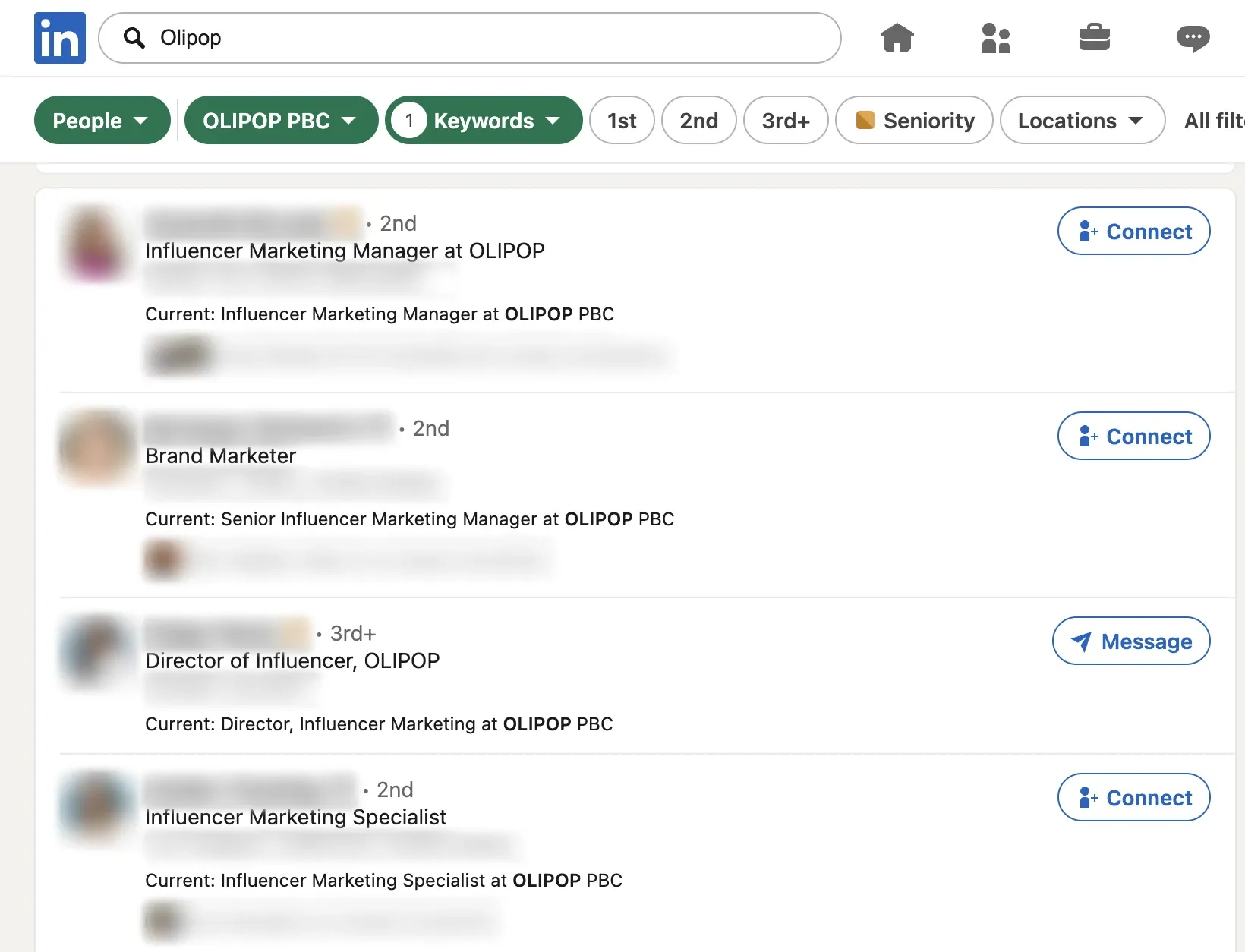
In this search, one brand returns an influencer marketing manager, a senior influencer marketing manager, a director, and a specialist. Read the current position, not only the headline: headlines are often out of date. Check the location as well, since a manager based in another country may only handle that market.
Prefer the manager or specialist over the director for a first pitch. They run the day-to-day creator programs and are more likely to read cold emails. Once you have the name, find the email address. A connection request with a short note is a backup, not the main channel.
4. Press pages and press releases
A brand's newsroom or Press page often ends with a media contact. Press releases published on newswires such as PR Newswire or Business Wire usually close with the same block: a name, an email, and sometimes a phone number. Searching Google for the brand name with "press release" or "media contact" brings them up quickly.
That contact is often at the brand's PR agency. It is a good fit for gifting and product launches, less so for paid campaigns, which are usually run by the influencer team. Use the press release to learn about the launch, then mention it in your pitch to show you follow the brand.
How to guess and verify a brand's email format
When you have a name but no address, the email is usually predictable. Most companies use one format for everyone.
- Confirm the email domain. It is not always the website domain. A brand can sell on brand.com and use brandhq.com or a regional domain for email. Check any address published on the site or in a press release.
- Find one real address from the same company. Search Google for
"@domain.com"with the brand name, check press releases and the Contact page, or use an email finder: Hunter's Domain Search lists the addresses it has found for a domain. One known address is enough to see the pattern. - Apply the pattern to your contact's name. The most common formats are [email protected], [email protected], first initial plus last name ([email protected]), and first name plus last initial ([email protected]).
- Verify before sending. An email verifier such as Hunter's Email Verifier checks whether the address exists. A "valid" result is a green light. An "accept all" result means the company's server accepts every address, so the check cannot confirm yours: prefer a published address in that case, or send to your best guess once.
- Send to one address at a time. Do not send the same pitch to five guessed variations. Bounced emails hurt your sender reputation and make your future emails more likely to land in spam. If one bounces, try the next format.
No name at all? Many brands use role inboxes such as pr@, press@, partnerships@, collabs@, or influencers@ followed by their domain. Prefer one the brand publishes, and run a guessed one through the verifier before sending.
Stick to professional addresses. A personal email found on a forum or an old social profile is not an invitation to pitch.
If you still cannot find the right contact
Some brands publish nothing and hide their team on LinkedIn. A few last options before moving on:
- Ask customer support one precise question. Write: "Who handles creator partnerships, and what is the best email to reach them?" Support teams often forward the message or share the right address.
- Find the agency behind the brand. Press releases often name the brand's PR agency, and agency websites list their clients. On LinkedIn, account managers frequently mention the brands they handle in their title.
- Look at the brand's paid partnership posts. On Instagram, sponsored posts show "Paid partnership with" and the brand name. The creators behind them can tell you who ran the campaign, and creators your size are often happy to answer a short, polite DM.
- Check that the person still works there. People in influencer marketing change jobs often. Confirm the current position on LinkedIn before sending, or your pitch lands in an inbox nobody reads.
- Come back with a trigger. A new launch, a new market, or a new influencer marketing hire announced on LinkedIn is a good reason to try again a few weeks later.
The faster route: Find Sponsors
Searching each brand by hand takes time when your list has 30 or 40 names. The Find Sponsors directory in CreatorsJet gathers the people who run creator partnerships at brands, with their role, their LinkedIn profile, and their professional email when one is available.
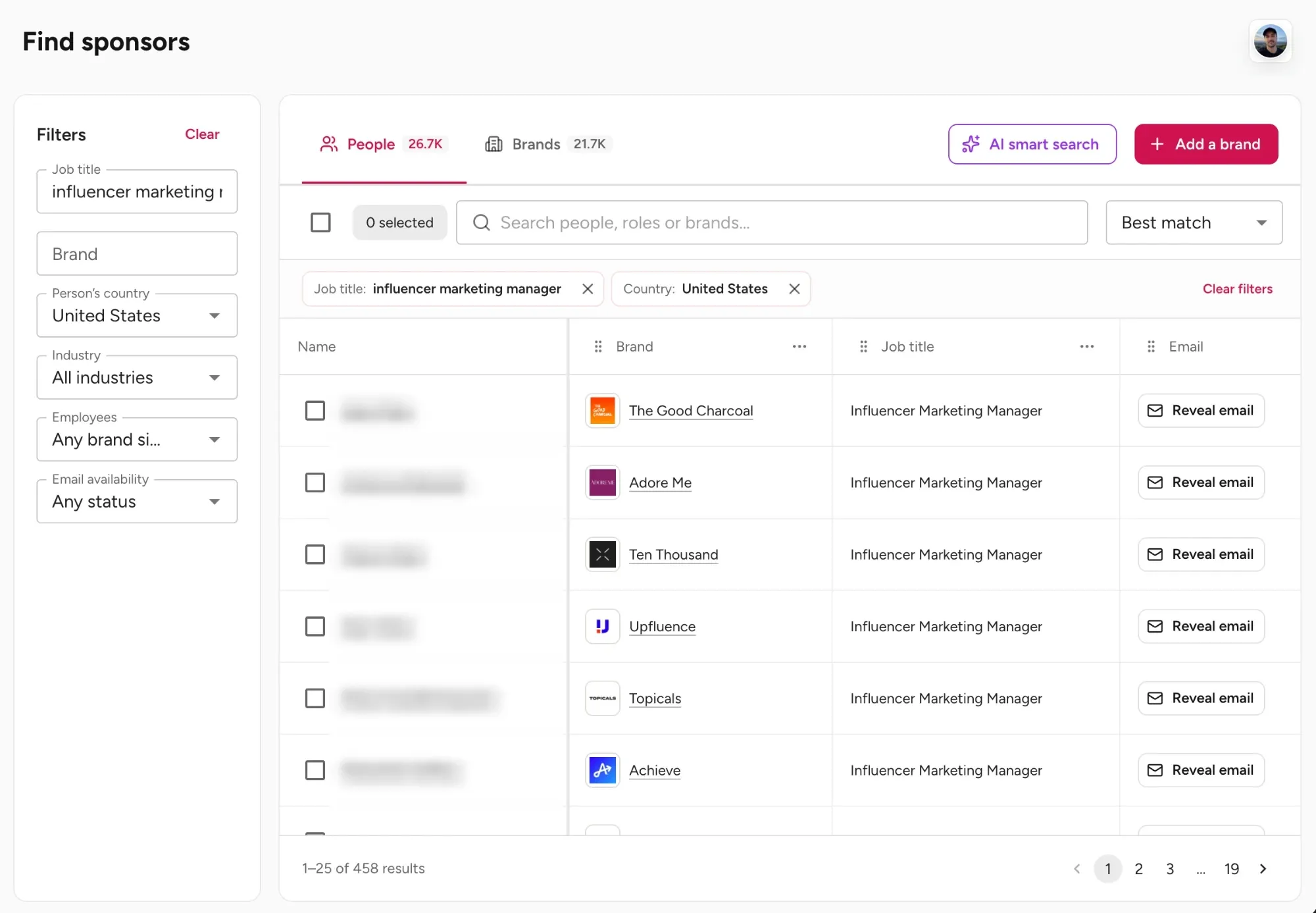
You can search a specific brand by name, filter by job title, country, industry, company size, and email availability, or describe what you are looking for in plain language with AI smart search, for example influencer marketing managers at beauty brands in the United States. Contact details vary by person, and the feature is part of the Creator Max plan. The pitch still has to be personal: the directory saves the search, not the writing.
Before you send the email
Finding the contact is half the work. The email itself decides whether that person replies:
- Write a subject line about them. Name the brand and the idea in a few words, such as "Spring launch: 3 Reels for curly hair". A subject like "Collaboration opportunity" looks like every other pitch in the inbox.
- Open with something recent. Mention a launch, a campaign, or a creator video the brand shared in the last few weeks. It shows the email was written for this brand, and it is the line the reader sees in the inbox preview.
- Propose one concrete idea. Say what you would create, on which platform, and when, for example two Reels and three stories during launch week. One clear idea is easier to approve than a menu of options.
- Give proof in one or two lines. Show the audience match (country, age range, niche) and one result from past content, such as saves, link clicks, or sales from a code. The full stats belong in the media kit.
- Link your media kit instead of attaching it. Company email filters often flag or strip attachments from unknown senders, and a link always shows current numbers.
- End with an easy question. Ask whether the idea fits their plans for the launch, or who handles creator partnerships if it is not them. A yes or no question gets more replies than "let me know your thoughts".
- Follow up once, then move on. If there is no reply after about a week, send one short follow-up that adds something new, such as a recent result. After that, try another contact at the brand.
To turn these points into a first draft, the brand pitch email generator writes a pitch with this structure that you can adapt to each brand.
Mistakes that waste a good contact
- Pasting your pitch into a customer service inbox. Support and info@ inboxes answer order questions, and a full pitch sent there is rarely forwarded. Asking support who handles creator partnerships, as described above, works better.
- Using bought PR email lists. Shared lists go out of date fast, and the addresses on them receive the same pitch from hundreds of creators.
- Emailing the whole team at once. Copying three people on the same email, or sending it to each of them separately on the same day, looks like a mass mailing. Contact one person at a time.
- Ignoring the region. A pitch to the US team about an audience in France will be forwarded at best, ignored at worst.
Start with one brand
Pick one brand you already use, find the right person with the four sources above, and verify the address before you write. Once the process is familiar, it takes a few minutes per brand, and a directory makes it faster when your list grows. For everything that comes after the first reply, from negotiating to delivering, see the guide on how to get brand deals as a content creator.
The contact gets the email opened. The pitch is what gets the reply.