

A long YouTube video can be useful without being easy to navigate. Viewers may want the full conversation, lesson, interview, or podcast, but still need a quick way to find the section that answers their question. YouTube chapters solve that problem when they describe real changes in the video and begin at the moment the topic changes.
The practical rule is simple: use chapters for meaningful sections, name them with words viewers would recognize or search for, and do not add a marker every time the subject briefly shifts. Chapters should make the video feel more organized, not like a table of contents pasted over an unstructured recording.
What YouTube chapters actually do
Chapters divide a video into named sections. The timestamps appear in the description, and YouTube can use them to segment the progress bar so viewers can preview sections and jump between topics.
That creates two navigation layers. The description gives viewers a scannable outline, while the player lets them see the current section and move through the video without guessing where a topic begins. Your screenshot shows the difference clearly: a long outline helps someone choose a destination, while the player preview confirms where they will land before they jump.

Chapters are not a replacement for editing. When every chapter title is vague, the transitions are abrupt, or the opening delays the promised value, adding timestamps only makes the underlying problem easier to see.
When chapters help the viewing experience
Chapters are most useful when the video contains several distinct questions, steps, examples, or story phases. A tutorial can separate setup, the main workflow, troubleshooting, and next steps. An interview can group topics that viewers may want to explore independently. A long review can separate design, performance, drawbacks, and alternatives.
They are particularly helpful when:
- viewers may arrive with different questions;
- the video is educational, instructional, documentary, or interview-led;
- the creator wants the full runtime to remain available without forcing every viewer to watch linearly;
- the chapter names set expectations accurately before a viewer clicks;
- the sections are long enough to feel like sections rather than interruptions.
Chapters can also improve the experience for returning viewers. Someone who watched part of a two-hour conversation can come back to a relevant topic instead of scrubbing through the entire timeline.
When chapters can hurt
More chapters are not automatically better. A chapter marker can hurt when it splits a single idea into fragments, gives away a story beat, or encourages viewers to skip through a tightly edited sequence.
Leave chapters out, or use fewer of them, when:
- the video is short and has only one clear promise;
- the content is a narrative where order and surprise matter;
- the chapter titles reveal the conclusion of a case study or story;
- the video changes direction frequently but does not truly enter a new section;
- each segment would be too short to watch comfortably;
- a chapter would begin in the middle of a sentence, demonstration, or argument.
For example, a seven-minute reaction video probably does not need eight chapters. A 90-minute workshop probably benefits from a clear map. The right question is not “Can this video have chapters?” It is “Would a viewer understand the structure better if these sections were named?”
How to name chapters so viewers know what to expect
Chapter names should answer one small question: what will appear if someone jumps here? Use concrete language that describes the topic, action, or outcome.
Less useful names:
- The basics
- More thoughts
- Part two
- Some examples
More useful names:
- Set up the recording workflow
- Three mistakes that lower retention
- Test the microphone before filming
- What the contract actually allows
The second group helps the viewer decide. It also makes the outline useful after the video is published because the chapter title still explains the content without relying on the creator’s memory.
Keep the wording short enough to scan, but specific enough to distinguish one chapter from the next. Avoid stuffing every title with keywords. “YouTube chapters: how to add YouTube chapters” is less natural and less helpful than “Add chapters in the description.”
For a chapter-led tutorial, a useful pattern is:
- Context: what problem or question is being addressed.
- Action: what the viewer will see or do.
- Result: what changes or what decision the viewer can make.
You do not need all three in every title. Choose the part that helps someone select the right section quickly.
Place timestamps at real topic changes
The timestamp should mark the beginning of a meaningful section, not the moment a new sentence happens to start. Draft the chapter list after the rough cut, when the structure is stable, then check each marker against the actual edit.
Ask these questions at every timestamp:
- Has the purpose of the section changed?
- Would a viewer describe the new section with a different noun or verb?
- Does the title accurately describe what begins at this exact second?
- Does the previous section have enough time to land?
- Would moving the marker by a few seconds make the transition clearer?
Avoid placing a timestamp on a sponsor transition, visual cut, or new camera angle unless the content also changes. A chapter called “The sponsor message” can make the integration feel like an obstacle. When the sponsor is naturally part of a tutorial or review, name the useful topic instead, while keeping any required disclosure clear elsewhere.
Follow the basic YouTube format
YouTube’s current help guidance requires the first timestamp to start at 00:00, at least three timestamps in ascending order, and chapters that meet the platform’s minimum length. For the exact rules, check YouTube’s official guide to video chapter requirements, since platform details can change.
A simple block looks like this:
00:00 Introduction and the outcome
01:18 Choose the right recording setup
05:42 Build the first workflow
12:10 Fix the most common mistake
16:35 Final checklist
Use one timestamp format consistently. Keep the list chronological, use a space between the timestamp and title, and check the saved description on the public video. When you want to follow the process in Studio, YouTube’s chapter setup walkthrough shows where to add the timestamps.
The format activates the feature, but good chapter design does the rest. A technically valid list can still be confusing if the names are vague or the markers are too frequent.
Add chapters in YouTube Studio
Once the list is ready, add it directly to the video description:
- Open YouTube Studio and select Content.
- Choose the video you want to edit.
- In the description, add each timestamp and title on its own line.
- Save the video, then open the public watch page and test the chapter list and timeline.
You can add or edit chapters after publishing, so the final check does not have to happen during the upload itself. The important part is testing the public version, because a timestamp that looks correct in a draft can still land before the actual topic change after the edit is updated.
What to check when chapters do not appear
When the chapter labels are missing, check the feature requirements before rewriting the whole list:
- The first timestamp is exactly 00:00.
- There are at least three timestamps, in ascending order.
- Each chapter lasts at least 10 seconds.
- Every timestamp has a title and appears on its own line in the description.
- Your channel has access to the required YouTube features.
- The saved description is the one attached to the public video you are checking.
Automatic chapters are separate from creator-added chapters. YouTube may generate its own chapters when the feature is available, but manual chapters give you control over the boundaries and names. When YouTube’s automatic chapters create a confusing structure, review the relevant setting in Studio and keep the manual list aligned with the finished edit.
These checks solve formatting problems, not editorial ones. A list can appear correctly and still frustrate viewers if the names are vague, the markers are too close together, or the first chapter delays the reason they clicked.
Write chapters for viewer expectations, not the editing timeline
Your editing software may have markers for every take, camera change, sound check, or B-roll cue. Those are production notes. Viewer-facing chapters should reflect the questions and decisions that matter after publication.
Before writing the final list, turn the edit markers into viewer language. “B-roll 04” becomes “Show the final dashboard.” “Take two” becomes “Compare the two setups.” “Section 6” becomes the actual topic.
This is also where search behavior matters. A viewer who searches for a specific answer may scan the chapter list before deciding whether the video is worth watching. Chapters do not make an irrelevant video relevant, but clear naming can reduce the uncertainty around a long runtime. The broader relationship between titles, descriptions, topics, and discovery is covered in this YouTube SEO guide for creators.
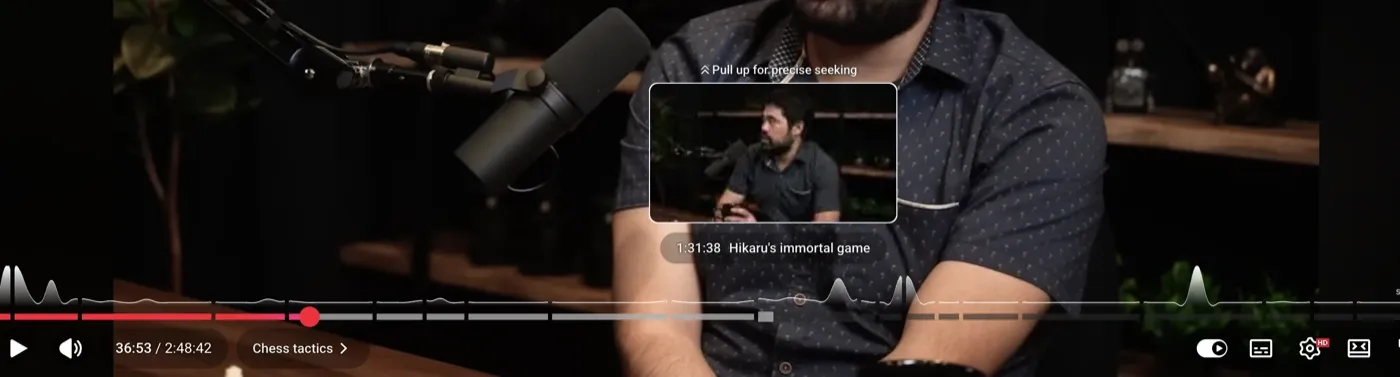
The player view is a useful final test. Hover or scrub around each marker and check that the preview, chapter label, and actual content agree. When the viewer expects a demonstration but lands on setup, move the timestamp or rename the section.
Use chapters without making the video feel fragmented
The best chapter list has a rhythm. It gives enough detail to navigate, but not so much that the outline becomes another long piece of content to process.
For a 20-minute tutorial, five to eight chapters may be enough. For a two-hour interview, more sections can be justified because the viewer may be looking for a particular topic. These are working ranges, not platform rules. The video’s structure matters more than a chapter count target.
Use a consistent level of detail. When one chapter is “Camera settings” and the next is “At 12:43, adjust the shutter speed for indoor daylight,” the outline feels uneven. Make neighboring titles comparable so the viewer can scan them quickly.
Do not use chapters to hide weak pacing. When a section repeats the previous point, edit it. When the introduction promises five steps but the chapter list reveals nine unrelated detours, fix the structure before polishing the timestamps.
A final chapter quality check
Before publishing, review the chapter block as if you have never seen the video:
- Does the first timestamp begin at 00:00?
- Are there at least three valid chapters, in chronological order?
- Does each chapter last long enough to be useful?
- Does every title describe a real topic change?
- Can a viewer predict what they will see after clicking?
- Are the titles consistent in tone and level of detail?
- Do the timestamps land on clean transitions?
- Do the chapter labels still make sense on mobile?
- Are any story reveals or conclusions unnecessarily exposed?
When the answer to several questions is no, fewer chapters may be better than a more detailed list.
The practical rule
Use YouTube chapters when they give viewers meaningful control over a long or multi-topic video. Start at 00:00, use clear names, place markers at real transitions, and test every jump against the finished edit. For short, tightly structured, or suspense-driven videos, a small number of chapters, or none at all, can create a better experience.
Chapters are a navigation layer. They should help viewers understand the video’s shape and choose their next step without making the creator’s structure feel more complicated than the content itself.