What is an influencer media kit?
An influencer media kit is your creator resume: a document or live web page that introduces you, your audience and your work to potential brand partners. It helps brands quickly understand whether you’re a good fit for a collaboration.
Your pitch proposes an idea for a specific brand. Your media kit backs it up with evidence of what you can deliver.
You don’t need a huge following or a previous sponsorship to make one. You need an accurate picture of the work you can deliver and the people you reach. For UGC projects where you create content for a brand’s own channels, lead with production skills and examples rather than follower count.
Free influencer media kit templates
Use a free, customizable influencer media kit template to organize your bio, audience stats, content examples and collaboration options in one place.
With a live media kit, you can update those details without changing the link you send to brands. When a brand revisits your kit, it sees your latest work and information without needing a new attachment.
Get started: Choose from 50+ customizable web media kit templates and adapt the layout to your content and the partnerships you’re pitching.
What should an influencer media kit include?
Include your bio, social profiles, audience statistics, work samples, services and a contact email address. Sam’s example kit shows how to organize your profile, rates and audience information.
Swipe to see the full kit
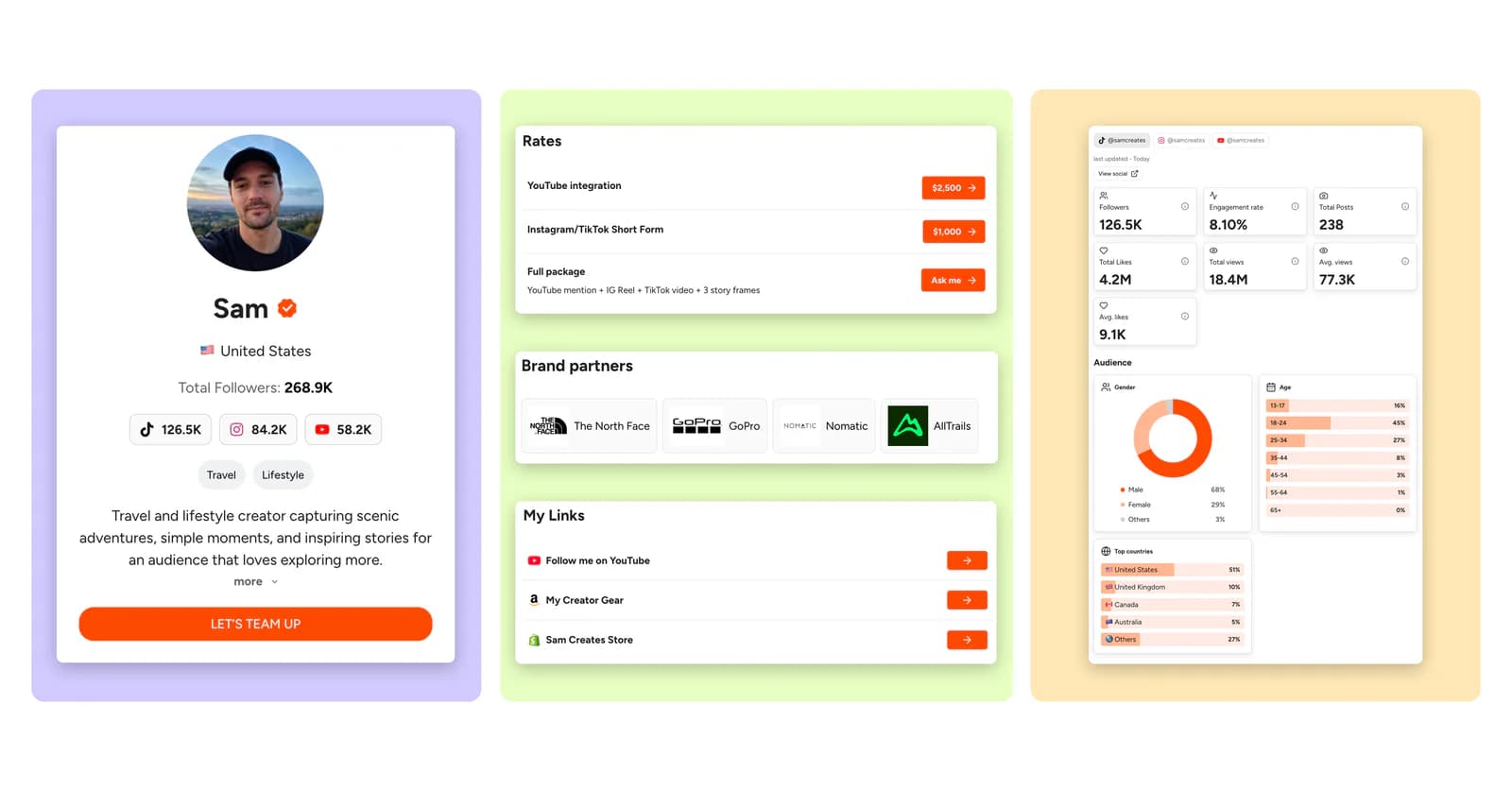
- Introduce yourself. The profile puts Sam’s travel focus, social accounts and contact button together.
- Make your offer clear. Named formats and packages explain the ways a brand can work with the creator.
- Support the fit with data. Platform statistics and audience breakdowns give the pitch context.
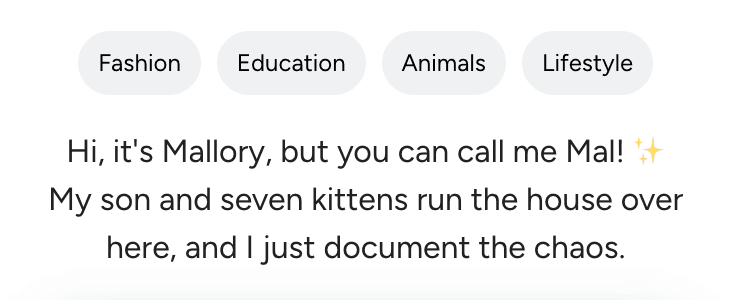
1. A short bio that says something specific
In two or three sentences, introduce yourself, explain what you create and who your content is for. Add a personal detail that helps brands understand your style and what makes your content yours.
Include your name, where you’re based and a clear profile photo. Mention relevant experience, and use a photo brands will recognize from your social profiles.
2. Audience and stats that show the fit
Start with the essentials. Include followers or subscribers, typical views or reach, engagement, and available audience demographics such as location, age and gender. Keep each platform separate, and distinguish formats such as YouTube Shorts and long-form videos.
Optional extras. If they help explain your performance, add average likes and comments, posting frequency or recent audience growth. Use the same reporting period so brands can compare the numbers.
“Average Reel views · Last 30 days · Instagram Insights” tells a brand what the figure measures, when it was measured and where it came from. Add your collection date and state the formula if you calculate engagement yourself.
Use comparable recent posts rather than only your best viral video. If one post skews the average, include the median, the middle result, to show typical performance. Cross-platform followers can overlap, so don’t label their combined total “unique reach.”
3. Work samples with context
Choose two or three pieces that match the work you want to book. For each one, name the format, your role and a result you can verify. “Produced and edited a 30-second product tutorial” explains more than an unlabeled thumbnail.
For a past collaboration, explain the brief, what you created and the outcome. Link to the content and include results you can verify, such as campaign views, link clicks or sales tracked through an affiliate code. State the campaign dates and where the figures came from.
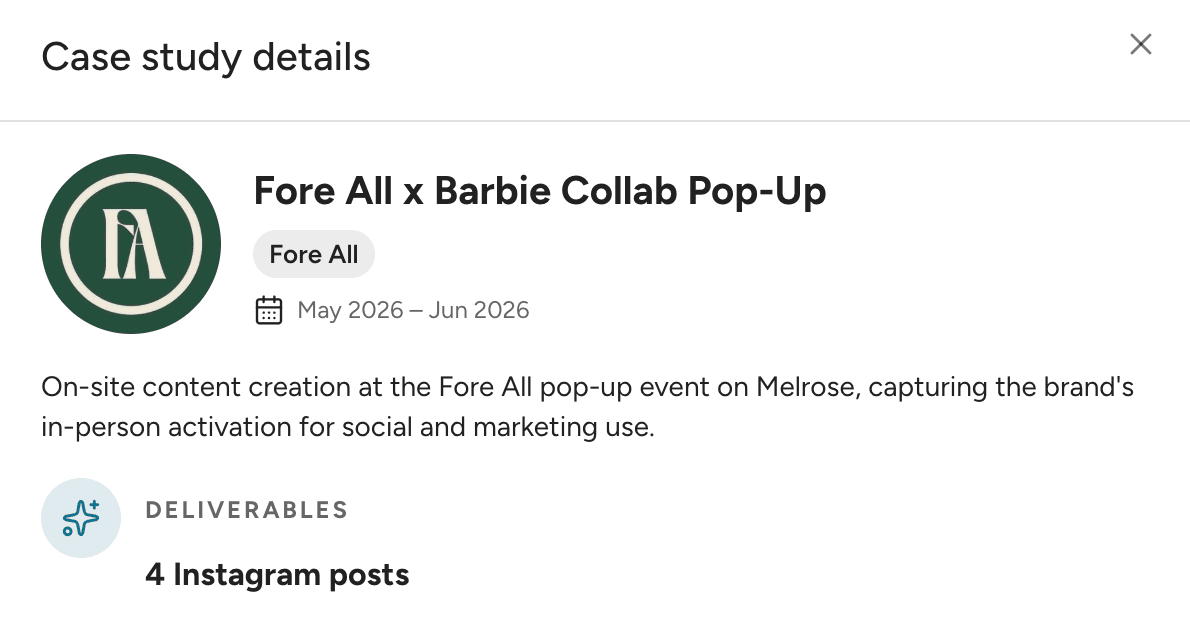
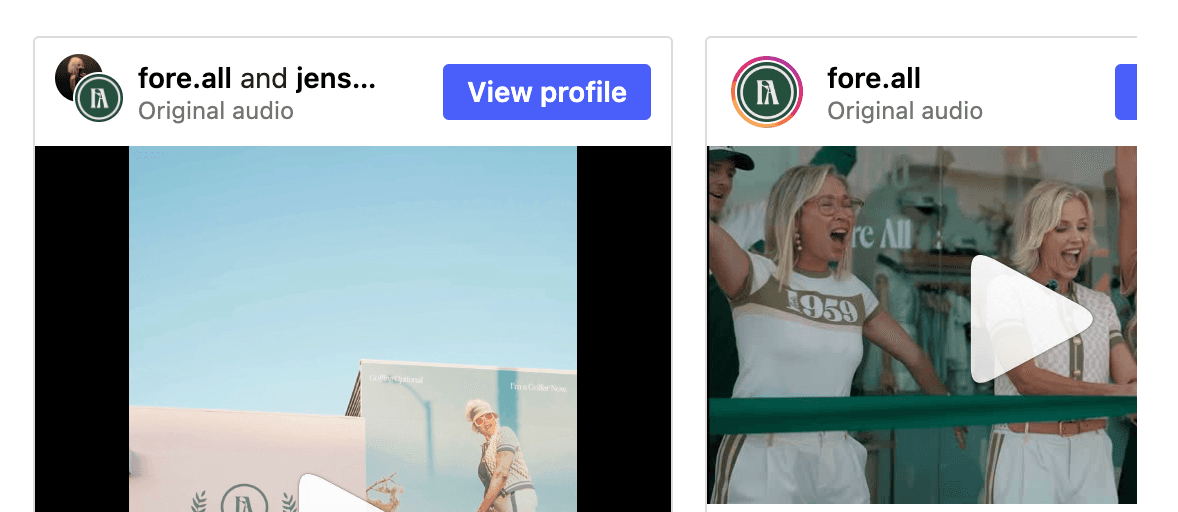
Have no sponsors yet? Use personal projects or sample UGC and label them accurately. Never imply that an unpaid concept was commissioned by the featured brand.
4. Brand partnerships and testimonials
Show relevant brands you’ve worked with and, with permission, a short client testimonial. A specific comment about your content, communication or campaign results tells brands more than generic praise. After a project, ask your contact what they valued most about working with you.
5. The ways brands can work with you
List the collaborations you actually offer, such as:
- Sponsored posts
- UGC videos
- Affiliate partnerships
- Event appearances
- Ongoing brand ambassadorships
Name the platform and format, and make it clear whether you’ll publish on your own channels or create content for the brand to use.
6. Rates are optional, but scope is essential
If you include a starting rate, show brands exactly what’s included: the content format, number of deliverables and revisions. Make it clear which extras cost more, such as paid ad usage, exclusivity, raw footage or a longer usage period.
For example: “One 30-second UGC video with one round of revisions. Includes three months of organic use on the brand’s social channels. Paid ad usage quoted separately.”
7. An easy way to get in touch
Add a business email or a clearly labeled contact button where brands can find it quickly. If a manager handles your partnerships, include their contact details. Check that the email and your social profile links work before sending your kit.
Which media kits received more collaboration inquiries?
We analysed 1,192 CreatorsJet kits that met our eligibility criteria to understand which features were linked to collaboration inquiries. Use these takeaways to keep your kit ready to share.
1. Kits with case studies were nearly 3× as likely to receive an inquiry
What to do: Showcase projects you’ve worked on, the content you delivered and the impact it made. Include results you can back up, such as views, engagement or sales, so brands can see what you bring to a collaboration.
2. Kits naming past brand partners were about 30% more likely to receive an inquiry
What to do: Show relevant brands you’ve worked with and link to the content you made for them. Add a sentence about your role so potential partners can understand your experience.
3. Kits with a rates card listing their services were about 14% more likely to receive an inquiry
What to do: Name the formats you offer and pair them with relevant examples. Make it easy to see both what a brand can book and the quality of work it can expect.
4. Kits with current stats were about 33% more likely to receive an inquiry.
What to do: Check your stats before sharing your kit. CreatorsJet automatically refreshes supported stats from connected accounts, reducing the time you spend updating them manually. You can also update your kit from Claude or ChatGPT with our media kit MCP server.
See the methodology below for sample sizes and limitations.
About this analysis
Sample: 1,192 public CreatorsJet kits created in 2026, one per creator, at least 30 days old with at least 10 recorded views. Agency and staff accounts were excluded. Activity covered January 1–October 6; kit content was checked on October 7.
How to create and share your influencer media kit
- Tailor your kit to the partnership. Choose audience information and work samples relevant to the brand. For a hotel collaboration, highlight travel content. For UGC work, emphasize your production skills.
- Choose your format. Use a PDF when a brand requests an attachment, or a live web kit you can update without changing the link.
- Keep the design easy to scan. Use clear headings, consistent colors and one or two readable fonts. Leave space between sections and make your contact details easy to find.
- Name, niche and short bio
- Relevant audience and key stats
- Your offer and contact details
- Selected work with context
- More detailed audience data
- Packages and genuine partnerships
Use this order across a web page or a short PDF. Add pages only when they help a brand assess the collaboration.
Start a conversation before you pitch
Spend time with the brands you’d like to work with: follow their content, leave a thoughtful comment or reply to a Story when you have something relevant to say. If you already use their products, share your experience naturally. These exchanges can give you a useful starting point for a personal pitch.
Find the right brand contact
Before sending your pitch, find brand contacts who handle influencer marketing or creator partnerships. If you’re unsure who to approach, send a short DM introducing your niche and asking for the best email address. Then follow up with your idea and media kit.
“Hi [brand team], I create [type of content] for [audience], and I enjoyed [specific product or post]. I have a content idea for [brand]. Who’s the best person to email about creator partnerships?”
Check it, then send a personal pitch
Open your kit on a phone and in a private browser window. Check the links, viewing permissions and current statistics. Keep pricing in a separate rate card if it changes with each project.
Send the kit in an email or an existing brand conversation. Briefly explain the fit, suggest a specific idea and include your link or PDF. Use your kit to support that personal message rather than replace it.
“I’d love to create [specific idea] for [brand]. Here’s my media kit with audience details and examples of my [relevant work]: [link]. Would you be open to discussing a collaboration?”
Real influencer media kit examples
Here’s how real creators put these ideas into practice. These examples show how creators in different niches introduce themselves, present their work and help brands understand what a collaboration could look like.
Your kit doesn’t need to look exactly like any of these. Notice what makes each one easy to browse, from the way it groups content to how it presents services, and borrow the ideas that suit your own work.
Malik Zambezi
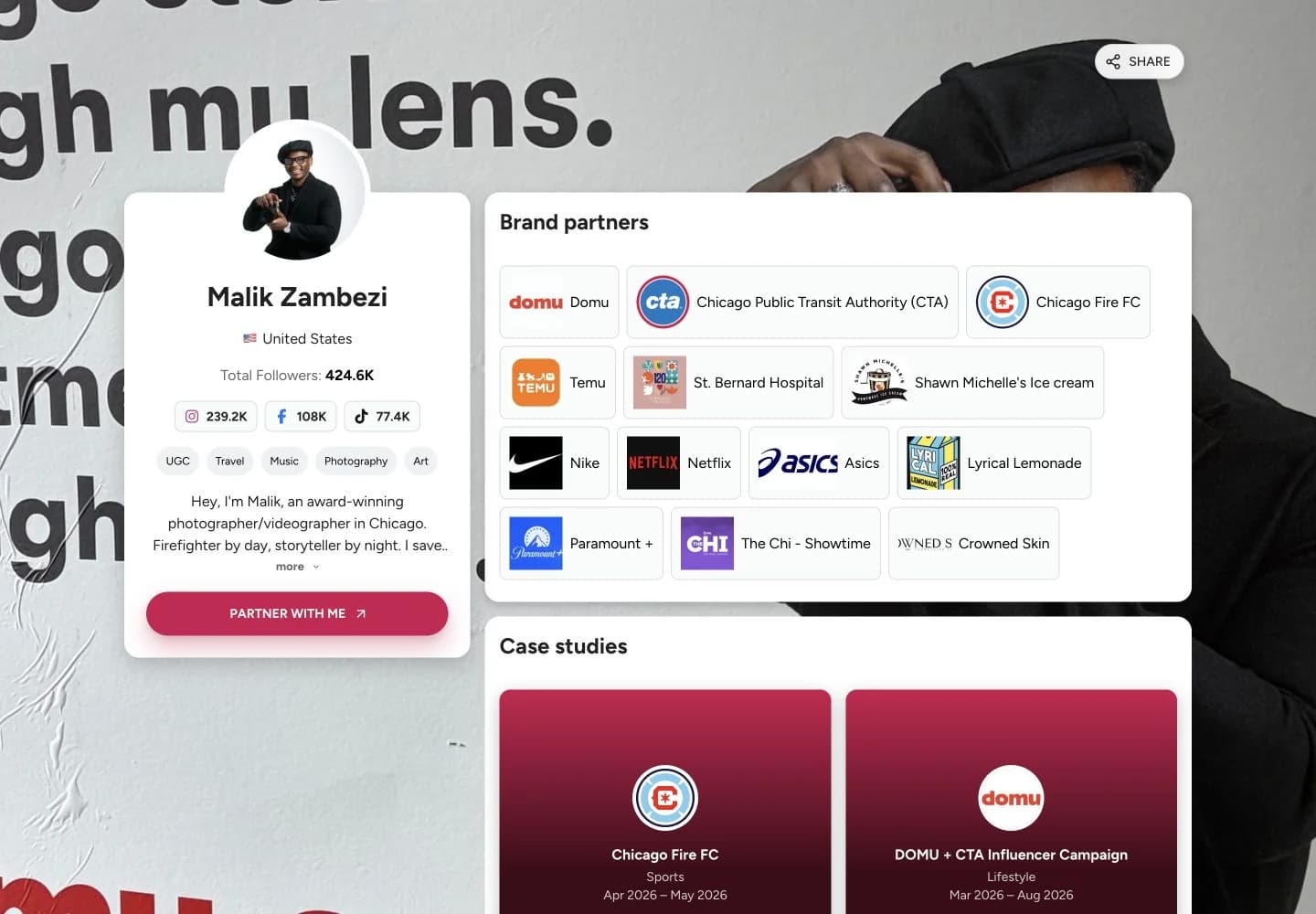
Malik lists more than a dozen brand partners, including Nike, Netflix and Asics, above two case studies for Chicago Fire FC and DOMU. Each case study explains his role and links to the published posts. In our research, kits with case studies were nearly 3× as likely to receive an inquiry, and kits naming past brand partners about 30% more likely. Malik’s kit does both.
Source: Malik ZambeziSara Shun
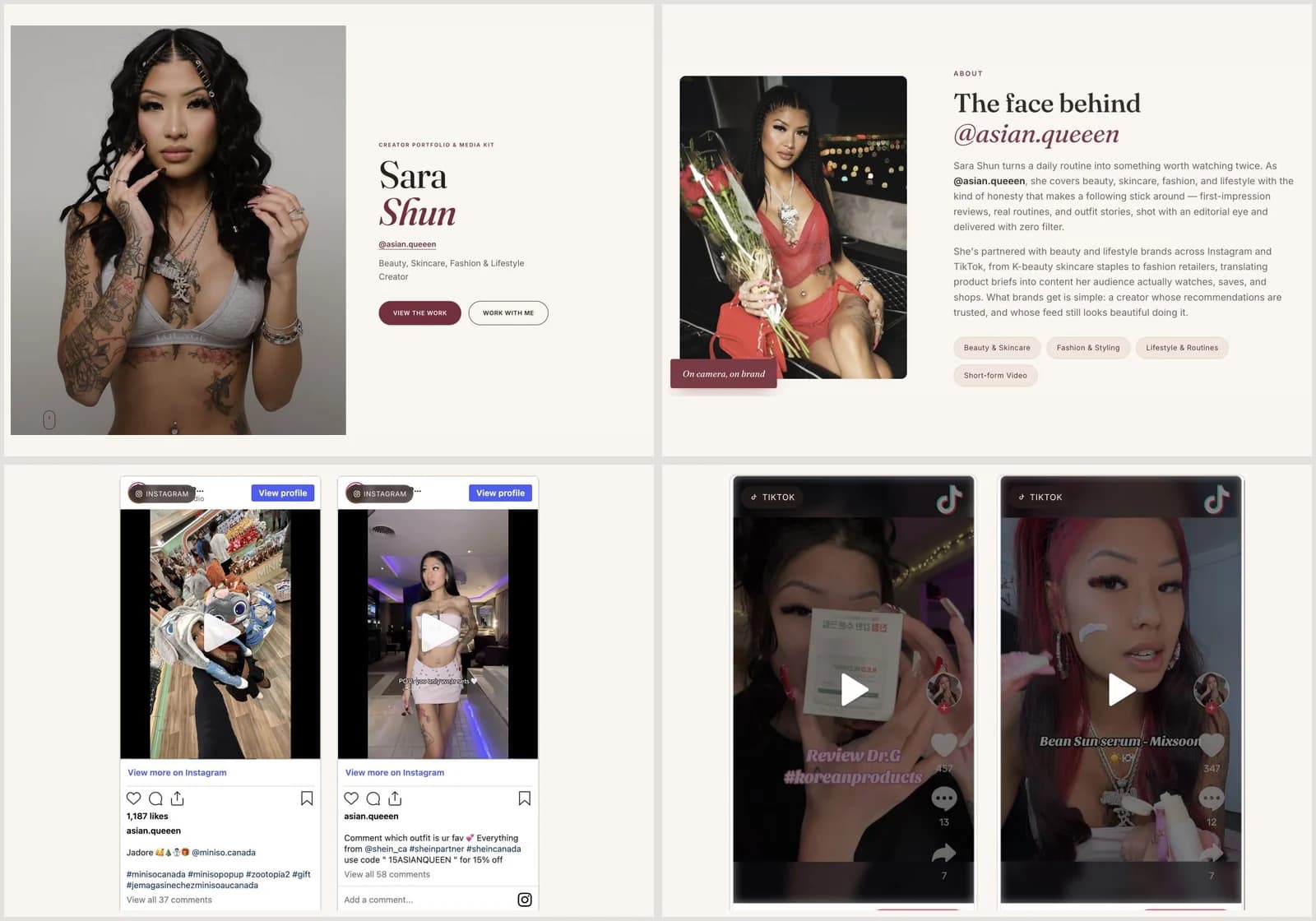
Sara labels campaign previews by brand and platform. Each links to the original post, so visitors can see the finished work. This gives a brand a clear path from her introduction to the content itself, without having to search her social profiles.
Source: Sara ShunSuzie Taylor
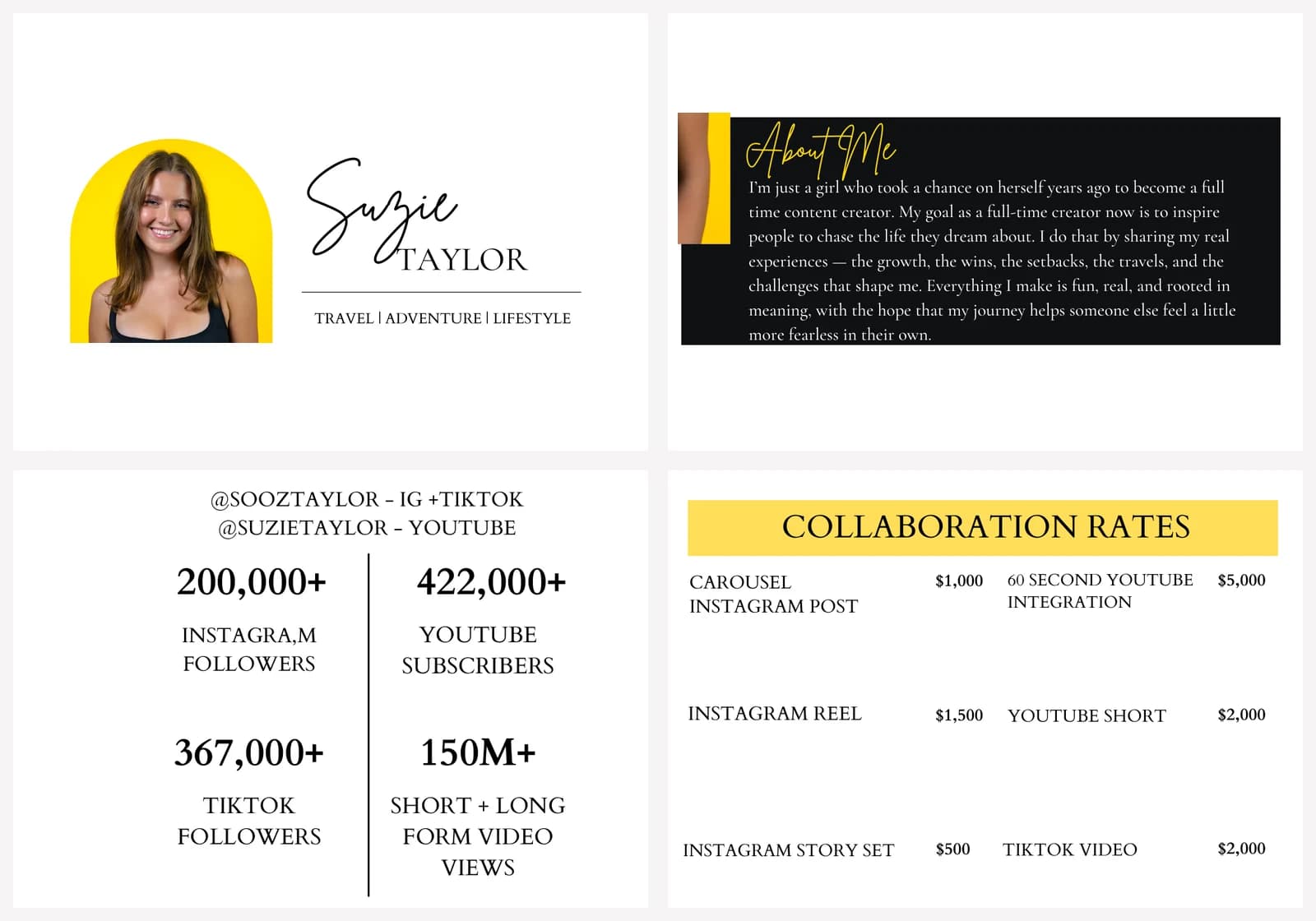
Suzie fits her travel and lifestyle introduction, audience details and rates onto one page. Clear sections make her collaboration formats easy to compare. The simple layout makes it easy to scan her profile and compare formats before starting a conversation about a campaign.
Source: Suzie TaylorBefore you send: a media kit checklist
- My niche and offer are clear in the first few sentences.
- Metrics have a source, reporting period and collection date.
- I distinguish typical performance from exceptional results.
- My examples match the type of work I want to book.
- Samples and genuine paid collaborations are labeled accurately.
- Rates, if included, describe scope and relevant limitations.
- Every link works without requesting editing access.
- The kit is readable on mobile and my contact details are current.
Influencer media kit FAQ
What is an influencer media kit?
An influencer media kit is a document or web page that introduces a creator to potential brand partners. It brings together their niche, audience, social metrics, content examples, services and contact details so a brand can assess whether a collaboration is a good fit.
How many followers do you need for a media kit?
There is no minimum follower count. Make one when you start approaching brands or responding to collaboration requests. With a small audience, emphasize relevant content, audience fit, engagement and the services you can deliver. For UGC work, your production skills and portfolio may matter more than your following.
How long should an influencer media kit be?
One or two pages is a useful starting point for a PDF. A web kit can be longer, but put your introduction, key audience data, work samples and contact details where a brand can find them quickly. Add more pages only when they provide relevant evidence.
Should I put my rates in my media kit?
Include starting rates or packages if your services are fairly standardized. Keep a separate rate card or quote individually when usage rights, exclusivity, production costs or deliverables change the price. Clearly state what a listed price includes.
What if I have no previous brand collaborations?
Use relevant organic posts, personal projects or clearly labeled sample UGC. Explain your role and the results you can verify. Do not describe a sample as a paid collaboration or add a brand logo in a way that implies a partnership that did not happen.
Can I create an influencer media kit for free?
Yes. You can create a PDF with a free document or design tool. CreatorsJet also offers a free customizable media kit you can share with brands as a link.
How often should I update my media kit?
Check your metrics, links, contact details and availability before each new pitch. Use a consistent reporting period and show when the figures were collected. Update your portfolio when you have more relevant work, and your pricing whenever your offer changes.
Is an influencer media kit the same as a press kit?
The terms overlap, but the audience matters. An influencer media kit is usually built for brand collaborations. A traditional press kit helps journalists cover a person or business and may include press releases, approved images and company information. A rate card focuses specifically on prices and deliverables.
Build your media kit with CreatorsJet
Bring your profile, audience statistics, work and rates together in a shareable web kit.
See the media kit builder →


